
Automattic for Agencies Partners can earn income in three ways:
- Referrals—Refer your clients to Automattic and earn a commission on their purchases.
- Wholesale—Buy hosting at volume-discounted rates and resell to your clients. Wholesale purchases do not earn a commission, but they may be eligible for other incentives as outlined below.
- Migrations—When we offer promotions, earn a per-site bonus for migrating existing sites to Automattic.
Your earnings will fluctuate based on your volume of business with us.
Program Details
- Referrals
- Wholesale
- Setting up your payouts
- Payout calculation and schedule (Referrals · Migrations)
Referrals
Hosting and Product Referrals (Customer Purchase)
| Products | Earnings | Additional Terms |
| WordPress.com or Pressable.com hosting | You will earn a 20% commission on hosting subscriptions for new sites (and subsequent subscription renewals). | For WordPress.com and Pressable plans to be eligible for commission, referrals must be processed through the referral cart tool in your Automattic for Agencies dashboard (or another method determined by Automattic). Automattic for Agencies owns the billing relationship with the end customer. Missed referrals cannot be retroactively credited. For Pressable Premium plans that can’t be referred through the Automattic for Agencies Marketplace, register the referral using the Premium plan referral form in your Automattic for Agencies dashboard, or contact your Partner Manager. Pressable accepts these referrals at its sole discretion, and no commission is payable for unaccepted referrals. You will earn a commission if a contract to purchase services from Pressable (“Customer Contract”) is entered into within one year from the date the referral was registered. Referrals that do not result in a Customer Contract within that year will expire. If a commission-eligible product cannot be processed through the Automattic for Agencies referral cart, the purchase must be attributable to your agency as determined by Automattic — contact your Partner Manager for product-specific requirements. If a product is available in the Automattic for Agencies dashboard, the referral must be processed through the referral cart to qualify for commission. To continue earning a commission, you must refer at least one new subscriber each year or have an active Automattic for Agencies purchase, starting from the date you joined the Automattic for Agencies program. Referring a client whose site you migrate to WordPress.com or Pressable also earns a 20% commission, under the same rules described above. The migration itself does not earn any extra commission, and moving a site between Automattic hosting products does not qualify for commission. Separately, we occasionally run migration promotions that pay a per-site bonus; see Payout calculation and schedule: Migrations below. |
| Jetpack products and Woo-owned extensions | You will earn a 50% commission on Jetpack products and Woo-owned extensions (and subsequent subscription renewals). Third-party extensions do not qualify for any commission. | For Jetpack products and Woo-owned extensions to be eligible for commission, referrals must be processed through the referral cart tool in your Automattic for Agencies dashboard (or another method determined by Automattic). Automattic for Agencies owns the billing relationship with the end customer. Missed referrals cannot be retroactively credited. To continue earning a commission, you must refer at least one new subscriber each year or have an active Automattic for Agencies purchase, starting from the date you joined the Automattic for Agencies program. |
| WordPress VIP | You will earn a commission on successful referrals as a percentage of the Net Revenue WPVIP receives under the Customer Contract during the first year: • VIP Premier Partners: 20% • VIP Pro Partners: 15% • All other Partners: 10% “Net Revenue” means the amount received by WPVIP, excluding taxes, refunds, and adjustments. | Register a referral for a prospective customer using the VIP lead form in your Automattic for Agencies dashboard. WPVIP accepts referrals at its sole discretion, and will generally decline a referral for a current WPVIP customer or for a prospect with whom WPVIP has actively engaged in discussions during the previous 12 months. No commission is payable for unaccepted referrals. You will earn a commission if a contract to purchase services from WPVIP (“Customer Contract”) is entered into within one year from the date the referral was registered. Referrals that do not result in a Customer Contract within that year will expire. |
WooPayments Referrals
| Products | Earnings | Additional Terms |
| WooPayments | You will earn a commission based on the Total Payments Volume (TPV) generated by client sites that are connected to your Automattic for Agencies account. New WooPayments clients You will earn 5 basis points (bps) on all TPV processed on new client sites you help launch after joining Automattic for Agencies. Example: A client store generating $1,000,000 in TPV per year = $500 annual commission. Pre-existing WooPayments clients You will earn a commission on WooPayments-enabled client stores you already manage, provided they are connected within 30 days of your agency joining Automattic for Agencies: Tier 1: $1,000,000+ TPV/year → 3 bps (e.g., $300/year on $1,000,000 TPV) Tier 2: $500,000–$999,999 TPV/year → 2 bps (e.g., $100/year on $500,000 TPV) Pre-existing merchants are reviewed daily over a rolling 365-day period to determine whether they qualify for commission. Full eligibility details: Earn revenue share when clients use WooPayments. | To add the free WooPayments extension to client sites, assign a license from the Automattic for Agencies Marketplace or install it directly via Plugins > Add New. For new WooPayments clients, you must connect client sites to your Automattic for Agencies account (using the Automattic for Agencies Client plugin or Jetpack) before the first WooPayments transaction is completed. Any site connected after its first transaction will not qualify for commission. For pre-existing WooPayments clients, connect client sites within 30 days of your agency joining the Automattic for Agencies program. |
Wholesale
| Products | Volume Pricing |
| Pressable.com Hosting | 1-Site: $25/month 3-Sites: $45/month 5-Sites: $60/month 10-Sites: $90/month 20-Sites: $155/month 50-Sites: $350/month 80-Sites: $545/month 100-Sites: $675/month For additional custom plans and pricing, please contact us. |
| WordPress.com Hosting | Sites / Monthly price / Price per site 1 / $25.00 / $25.00 2 / $50.00 / $25.00 3 / $50.00 / $16.67 4 / $60.00 / $15.00 5 / $62.50 / $12.50 6 / $70.00 / $11.67 7 / $77.00 / $11.00 8 / $80.00 / $10.00 9 / $84.00 / $9.33 10 / $85.00 / $8.50 11+: $8.50 for every additional site. |
After purchasing hosting, you can create sites from your licenses in your Automattic for Agencies dashboard. Instructions: Set up a WordPress.com site from a license and Create a new site at Pressable.
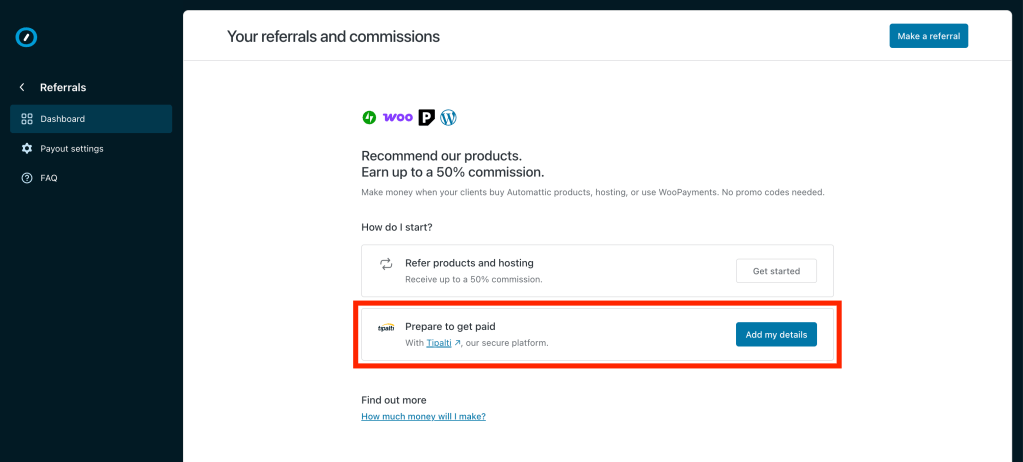
Setting up your payouts
We use Tipalti, a trusted commission payout platform, to help ensure a smooth and secure payout process. Payouts are sent in USD, but you can choose your preferred payout method and currency from Tipalti’s provided options.
- Open the Automattic for Agencies dashboard and choose Referrals or Migrations.
- Provide your bank information.
- Complete necessary tax documentation.
Our team generally reviews your submission within 3–5 days.
Make sure to keep your account information up to date to avoid any delays with your payouts.
Billing information requirement: You must enter and verify your billing information in our billing system before you can receive a payment. If the billing information is not completed by the payout date specified in the schedules below, you will not be eligible for payouts on referrals or migrations completed during that period.
Payout calculation and schedule
Referrals
- Commissions: Commissions are based on the referral transactions you make through the Automattic for Agencies dashboard. You must earn at least $50 in commissions before you can receive a payout.
- Payout schedule: Commissions are paid quarterly (every three months) with a 60-day waiting period. For example, if a referral purchase is completed in December, the estimated payout date will be March 2 of the following year. Commissions do not include any products that have been refunded or are subject to chargebacks.
- Processing time: Payout dates listed below refer to when the payout process starts. It may take a few extra days to complete a payout to ensure we include all eligible transactions and apply any necessary deductions (such as refunds or chargebacks).
- Weekend payouts: If the payout date falls on a weekend, payouts will be processed the next business day.
- WordPress VIP payouts: These do not have the 60-day waiting period and are paid on the next payout date.
| Quarter | Date of completed activity | Payout date |
| 1 | January 1 – March 31 | June 1 |
| 2 | April 1 – June 30 | September 1 |
| 3 | July 1 – September 30 | December 1 |
| 4 | October 1 – December 31 | March 2 of the following year |
Migrations
Automattic for Agencies periodically offers migration incentives that pay agencies a per-site bonus for moving an existing site from another (non-Automattic) host to an Automattic hosting property—Pressable, WordPress.com, or WordPress VIP. Specific bonus amounts, eligibility windows, and promotional terms vary by promotion and may change over time. Details of current Pressable migration promotions and their full terms and conditions can be found on Pressable’s legal page.
If Automattic suspects or determines there has been any fraudulent activity related to migrations, or that you have not complied with the promotional terms, payment may be withheld and you may be required to repay any previously earned incentives.
- Migration commissions: Your migration commissions are determined by the number of sites you migrate to Pressable, WordPress.com, or WordPress VIP and whether the hosting plan was purchased by your agency or by your agency’s client directly.
- Payout schedule: Commissions are paid quarterly (every three months), six months after the migration is completed, with a 60-day waiting period. For example, if you migrate a site in December, your estimated payout date will be October 31 of the following year. Commissions do not include any products that have been refunded or are subject to chargebacks.
- Processing time: Payout dates listed below refer to when the payout process starts. It may take a few extra days to complete a payout to ensure we include all eligible transactions and apply any necessary deductions (such as refunds or chargebacks).
- Weekend payouts: If the payout date falls on a weekend, payouts will be processed the next business day.
| Cycle | Date of completed migration | Site is live through | Payout date |
| 1 | September 1 – November 30 | May 31 | July 31 |
| 2 | December 1 – February 28/29 | August 31 | October 31 |
| 3 | March 1 – May 31 | November 30 | January 30 |
| 4 | June 1 – August 31 | February 28 | May 1 |

