

There’s a question every agency is fielding right now: why WordPress when a client can vibe-code a site in an afternoon, and there are dozens of closed-source tools promising to do the same?
Our team thinks about this daily, and Ronnie Burt, AI Product Lead for WordPress.com, opened the webinar with the honest answer. AI is a real shift, but it also a real opportunity. When a business owner or marketer spins up a site, agencies are still the ones who keep it secure, keep it fast, and keep it to date as the technology underneath keeps moving. The launch was never the hard part. Everything after it is, and that’s exactly where WordPress and its open source foundation stand apart.
There’s a reason the models are so good at WordPress: they were trained on open source code, and WordPress is one of the most documented platforms on the internet. As Ronnie put it, these models know WordPress better than just about anything else. Most of the demos ran on MCP, or Model Context Protocol, the connective layer that lets an AI assistant read a WordPress site and act on it through approved, permissioned steps instead of guesswork. Across WordPress VIP, Pressable, and WordPress.com, the throughline was the same: AI is a capable assistant your team still directs. Here’s what stood out.
In this recap:
- WordPress VIP: your brand standards and permissions come first, the AI works inside them.
- Pressable: a Friday-night checkout incident, triaged from a phone.
- WordPress.com: giving a site a memory of its own guidelines.
- Q&A: what agencies asked about cost, page builders, and monitoring.
Your standards come first, then the AI
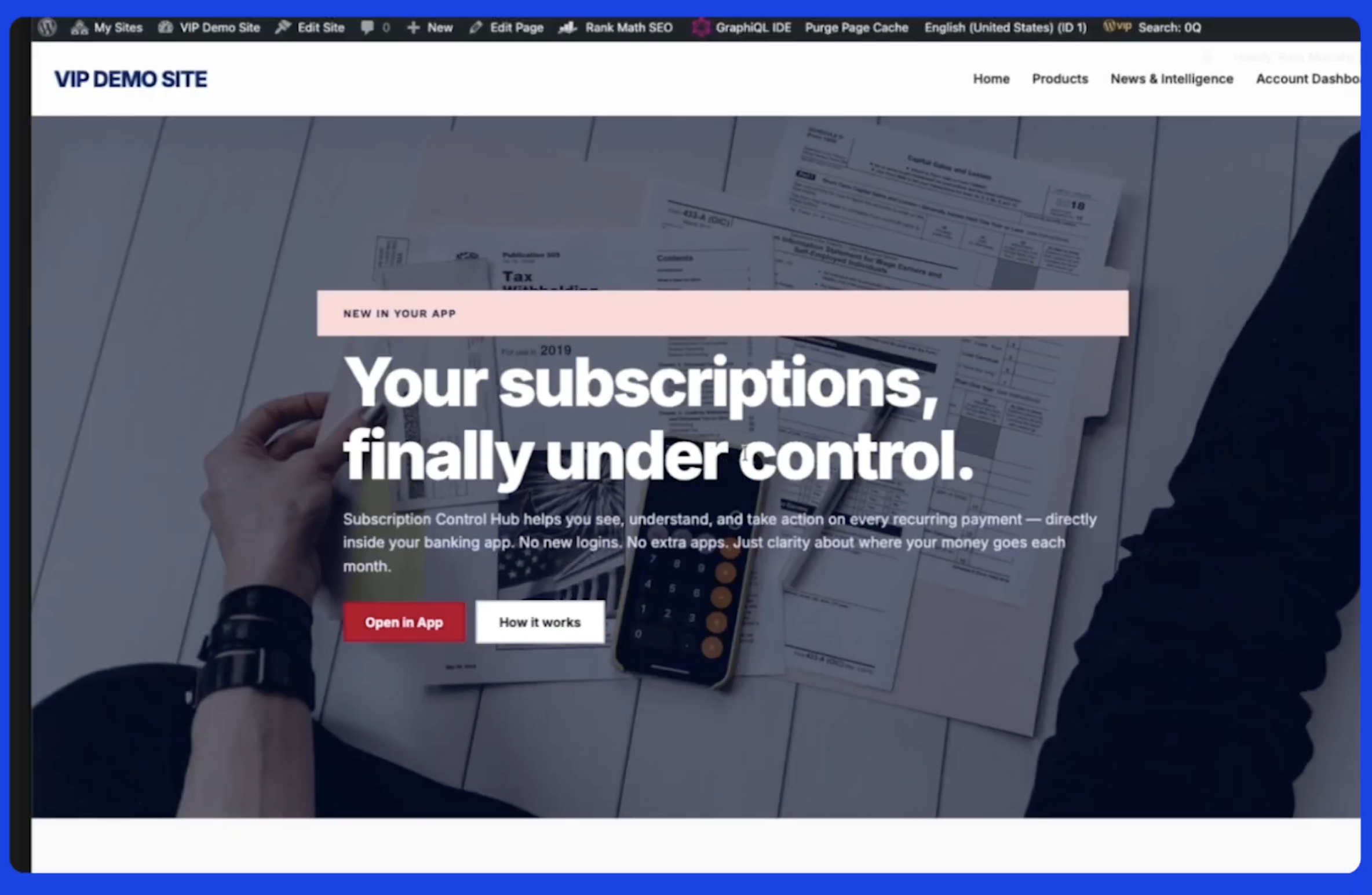
The WordPress VIP demo, led by Ross Mulcahy, Lead Solutions Engineer, and Travis Ralph, Principal Solutions Engineer, made one idea concrete: you don’t hand a model your brand and hope. Before a single word was written for a sample banking page, the model loaded the things that make a site yours: brand voice, design system, accessibility requirements, compliance guardrails, and rules about what can be claimed and what has to go to a human. Those become the model’s starting conditions in WordPress VIP.
Two things stood out. First, the AI works inside your existing WordPress permissions. It can only do what the person who signed in can do, and every action it takes is logged. Nobody has to rebuild access rules for the AI; your current setup already covers it. Second, when it built the page, it used your site’s own blocks and approved patterns and saved the result as a draft. Because it worked from the same materials as everything else on the site, nothing drifted from your design and no rogue code slipped in to slow the page down.
Travis then showed the maintenance side, using a locked-down version called Secure MCP that records every request and lets you approve or block whatever the AI tries to touch. One prompt ran 14 health checks on a site at once, from security vulnerabilities to unusual account activity, to how well the site was caching. What came back were findings you could act on, not just a dashboard. Then he ran the same check across all 26 sites in the organization. Work that used to eat an afternoon took minutes.
The Friday night save
Chris Miller, VP of Pressable Solutions, walked through a scenario every agency knows well. It’s 5:15 on a Friday, and three of your most important clients are messaging about issues with their websites, and worst of all, your biggest account is saying “our checkout has been up and down all day.”
“From the parking lot, Chris typed one sentence, and by the time he got home, the answer was waiting.”
Through Pressable MCP and Claude Dispatch, Chris asked his AI to triage all three sites, pull the logs, and sort the real problem from the noise. By the time he got home, the answer was waiting: two sites had low-priority errors, one had an ongoing checkout incident. Then the AI surfaced what the client hadn’t even reported: some payments returned a success code and charged the card, but no order was ever written. It was invisible on every dashboard, and about to become an expensive problem.
How the incident unfolded
5:15 PM: Three clients report issues and the biggest one is saying their checkout has been up and down all day. One message from the parking lot kicks off triage.
The walk home: AI uses Pressable MCP to triage all three sites, pulls logs, and separates the real incident from the noise: two low-priority errors, one live fire.
The find: A larger unreported failure surfaces; logs show success codes and charged cards, but no orders were written.
The check: AI tests its own theory. It confirms the plugin it originally blamed never actually changed. A checksum shows pristine files and rules it out as the culprit.
The fix: Instead of a risky restore, it clones the site and diffs against production, fixing the checkout and mitigating any risk to the live site while retaining the data.
The remediation: AI builds a reconciliation sheet: 123 mismatches across 53 orders, ready to work through in Stripe.
The follow-up call: I’ve found the issue on your site and found a larger one you didn’t know about. I fixed the checkout issue, protected your data, and I’m reconciling everything as we speak.
That call is the difference between losing a client and not just keeping them for another year but turning them into your evangelist.
Pressable MCP is live today. It’s free, and included on every plan.
Giving WordPress a memory
Ronnie closed with something that isn’t an MCP at all: AI tools built directly into WordPress, live on WordPress.com now and rolling out through Jetpack so they reach sites hosted anywhere.
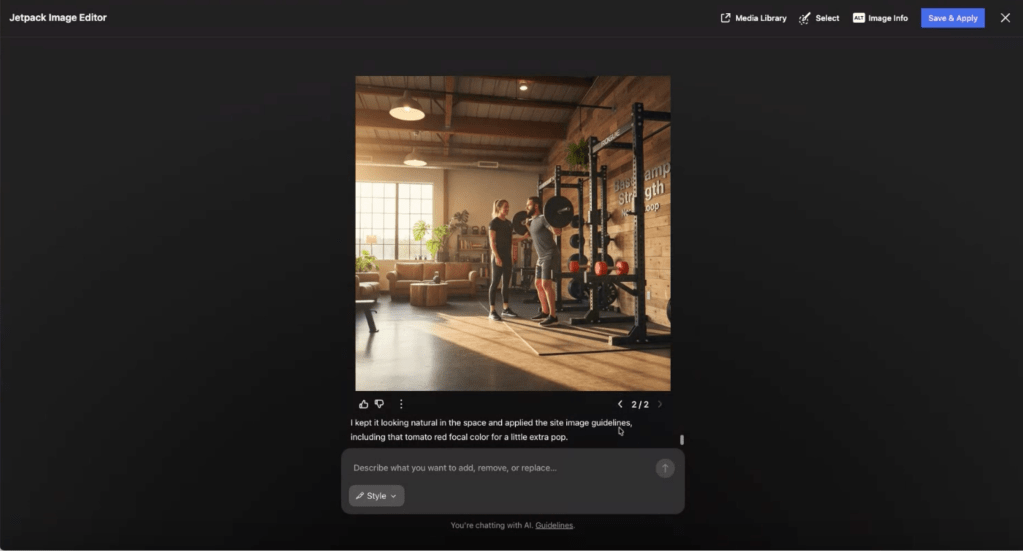
On a demo site for a fictional gym, those tools gave the site a memory of its own through guidelines. They captured who the site is for: people in their 40s, 50s, and 60s who’ve never set foot in a gym, plus a plain list of what to do and what to avoid (no “crush,” no “beast mode,” no “grind”). From there, editing an image pulled the brand’s exact accent color straight from those guidelines. A full editorial review flagged hype language and a missing call to action at the block level, with suggestions you apply or dismiss on the spot. And the agent isn’t stuck in WP Admin. It answers over Telegram and email, too. Ronnie forwarded a client’s request to lower a price, and the agent confirmed before making the change, then made it.
What agencies asked
Agencies wanted to know about cost first. The team was direct: Automattic is deliberate about using the right model for the right work rather than throwing the most expensive one at every task, and MCP access is included across WordPress VIP, Pressable, and WordPress.com.
On page builders and custom fields, tools like Divi, Elementor, and ACF work through WordPress core’s abilities API: register an ability, and the agent can use it natively.
Does this enable always-on monitoring? Yes, you can schedule scans across an entire fleet, interpret the logs through MCP, and fire alerts on fatal errors, traffic spikes, or plugin changes so you’re always the first to know.
Where WordPress fits
Across every demo, the same rule held true: the AI reads the logs or guidelines, reasons through the problem or recommendation, and drafts an answer for review, but a human always decides what actually ships.
All the work that lives long after launch, from maintenance to recurring audits and those Friday-night incidents, is exactly what these tools speed up. WordPress’s open source foundation is what makes that possible: it’s the platform the models understand best, and it stays yours to govern, with your standards and your sign-off on every change.


