

From time to time, our systems engineers write up a case study detailing a notable moment on the infrastructure front lines. The latest comes from Andrija Vucinic, an Automattician on our Systems Operations team, who is upgrading our fleet of database servers to MariaDB 11.8.
We’ve been running MariaDB since version 10.0.13, which was released around 12 years ago. With the recent improvements to the query optimizer, addition of online ALTER queries and support for vectors it was about time we upgraded our fleet of servers, some of which were still on 10.1… The server count today is 1,789, running various MariaDB versions. We started upgrading the servers to 11.4, but are planning to get all on 11.8.
We don’t run any multi-master deployments. One primary, and various # of replicas, depending on the service. The most common deployment is 1 primary + 2/3 replicas in origin DCs + 1 backup host.
Preparing hosts for upgrades in most cases is fairly easy for us. I would say there are 2 major cases: services which only connect to the local instance (e.g. DNS servers, edge servers…) and services that connect to many databases.
For the many-databases case we use HyperDB for WordPress. HyperDB is an advanced database class that supports replication, failover, load balancing, and partitioning. We can either update the configs to exclude the hosts we’re upgrading, or we can upgrade in-place if the upgrades are fast as HyperDB will just failover while the server is being restarted.
The local instance servers in most cases are behind anycast, so we just have to withdraw the routes. For the rare other cases it is configurable via config files.
And of course… backups! But makes sure they are working. Have you tried?
Persistent AUTO_INCREMENT for InnoDB
MDEV-6076 (Fixed in 10.2.4)
We tried to upgrade the less critical services first. We run community fork of Phrabricator called Phorge. It’s like GitHub, but open-source and with support for svn which we still use a lot. The DB was on 10.1, and I decided to go straight to 11.4. Upgrading the secondaries was (as always) pretty smooth. Then I upgraded the primary in-place.
Just a few notes in the logs:
...
2025-07-31 17:39:51 426575 [Note] InnoDB: Resetting PAGE_ROOT_AUTO_INC from 411 to 1244743 on table `phabricator_audit`.`audit_transaction` (created with version 50534)
...
That seemed to work as expected. But the Web UI was reporting a lot of errors. And as it often happens, the errors aren’t easy to read. After manually adding some more error logging to surface the database errors:
Duplicate entry '...' for key 'PRIMARY'
With the PAGE_ROOT_AUTO_INC resets I was fairly certain what it could be. Wrote a bash script to check and fix:
#!/bin/bashINSTANCE=$( ls /etc/mysql/mysql* | cut -d / -f 4 | sed 's/\.cnf$//' )DB=$($MYSQL --defaults-file=/etc/mysql/${INSTANCE}.cnf -N -e "SELECT UNIQUE(table_schema) FROM INFORMATION_SCHEMA.TABLES");for db in $DB; do for table in $($MYSQL --defaults-file=/etc/mysql/${INSTANCE}.cnf -N -e "SELECT table_name FROM INFORMATION_SCHEMA.TABLES WHERE TABLE_SCHEMA = '$db'"); do # Grab current auto increment from table info TABLE_AC=$($MYSQL --defaults-file=/etc/mysql/${INSTANCE}.cnf -N -e "SELECT AUTO_INCREMENT FROM INFORMATION_SCHEMA.TABLES WHERE TABLE_SCHEMA = '$db' AND TABLE_NAME='$table'") if [ $TABLE_AC == "NULL" ]; then continue fi # Grab the auto increment column. There can be only 1 PK with AC. PRIMARY_AC_COLUMN=$($MYSQL --defaults-file=/etc/mysql/${INSTANCE}.cnf -N -e "SELECT COLUMN_NAME FROM INFORMATION_SCHEMA.COLUMNS WHERE TABLE_SCHEMA = '$db' AND TABLE_NAME = '$table' AND COLUMN_KEY = 'PRI' AND EXTRA LIKE '%auto_increment%'") if [ -z "$PRIMARY_AC_COLUMN" ]; then echo "$db.$table couldn't find primary key" continue fi # Actual MAX($PRIMARY_KEY) MAX=$($MYSQL --defaults-file=/etc/mysql/${INSTANCE}.cnf -N -e "SELECT MAX($PRIMARY_AC_COLUMN) FROM \`$db\`.\`$table\`") if [ $MAX == "NULL" ]; then continue fi # All fine if table info AC larger than MAX($PRIMARY_KEY) if [ $TABLE_AC -gt $MAX ]; then continue fi NEW_AC=$((MAX+1)) echo "$db.$table auto increment mismatch: [current: $TABLE_AC] [MAX($PRIMARY_AC_COLUMN): $MAX]. Updating to $NEW_AC" $MYSQL --defaults-file=/etc/mysql/${INSTANCE}.cnf -N -e "ALTER TABLE \`$db\`.\`$table\` AUTO_INCREMENT = $NEW_AC, ALGORITHM=INSTANT" donedone
I was a bit surprised to find ~10% of the tables had auto-increment reset to 0.
While changing the auto-increment should be just a metadata change, in weird rare cases of very old tables MariaDB decides to do a table rebuild. And we all know how bad a long running ALTER table is. In our case, HyperDB tries to use non-lagging hosts, which in this case would only be the primary server. While it might survive the load spike, we’d rather not have such tests in production.
That’s where ALGORITHM=INSTANT comes into play (which I added later). If it’s planning to do a table rebuild, it will fail.
The case where I caught the rebuild was on 200GB+ table. I just crafted a bogus INSERT INTO to bump the auto-increment and was done with it.
Opening all .ibd files on InnoDB startup can be slow
MDEV-32027 (Fixed in 10.6.17, 10.11.7, 11.0.5, 11.1.4, 11.2.3, 11.3.2)
This one made us really happy… While not an upgrade problem directly, it showcases some specifics with our deployment. What’s the highest # of tables in a single database you’ve worked with?
db-host:/var/lib/mysql# find . -type f -name "*.ibd" | wc -l
5316915
Not sure there are too many cases similar to ours here, but we have a lot of instances with 5 million+ tables. On ext4 we also had to increase the number of inodes by setting bytes-per-inode to 8KB to fit this many files.
db-host:~# df -i
Filesystem                Inodes     IUsed    IFree IUse% Mounted on
...
/dev/mapper/crypt-root 233568256 152168294 81399962   66% /
...
This made server restarts for instances with InnoDB tables quite long. For this specific instance MariaDB 10.4.32 took ~6 minutes to restart.
2026-01-27 16:46:38 0 [Note] Starting MariaDB 10.4.32-MariaDB-log source revision c4143f909528e3fab0677a28631d10389354c491 as process 212645
2026-01-27 16:52:29 0 [Note] /usr/local/mariadb10.4/bin/mysqld: ready for connections.
After upgrade to MariaDB 11.8.5 it takes ~50 seconds.
2026-02-19 16:18:53 0 [Note] Starting MariaDB 11.8.5-MariaDB-log source revision a74edc42d080a73e20d5d94e1dd5beea400b507c server_uid iGwvQxgUodxkER0AgD5iMnvSkgM= as process 2053034
2026-02-19 16:19:42 0 [Note] /usr/local/mariadb11.8/bin/mariadbd: ready for connections.
Old data formats (temporal and decimal)
While we don’t run MySQL 4.0 anymore, some of the tables were created quite a long time ago. Like 21 years ago.
`date_registered` datetime /* mariadb-5.3 */ NOT NULL DEFAULT '0000-00-00 00:00:00',
`amount` decimal(5,2) /*old*/ NOT NULL DEFAULT '0.00',
There were changes to the internal representations of decimal and temporal formats. This isn’t a problem per-se, but we decided to get it updated as part of the “big upgrade”. There are multiple reasons why to do this:
DATETIMEformat down to 5 bytes from 8 bytes. Can also store fractional seconds (+3 bytes if defined as such).DECIMALformat halved storage requirement and changed from ASCII to packed binary. This also improves the speed of any arithmetic operations over the data. New format also enforces definition limit.
For the temporal types rebuilding the table is enough. We usually rebuild the replicas first, or if the replicas need upgrading we update the backup and restore from it.
The decimal one had a surprise… DECIMAL(5,2) should be -999 to 999. Nope.
MariaDB [wpmu-global]> SELECT ID, amount FROM store_paypal_transactions WHERE ID = 49417097;
+----------+---------+
| ID       | amount  |
+----------+---------+
| 49234097 | 1675.00 |
+----------+---------+
Found it while trying to switch a DATETIME column in an old table that also had DECIMAL. The rebuild was failing because it couldn’t store the values already in the table. Had to increase to DECIMAL(8,2) to fit all the values already in the table. This is a huge table, so we use tools like pt-online-schema-change to do such changes in production.
Multi-instance table cache
MDEV-10296 (Fixed in 10.2.2)
We run the servers with:
table_open_cache=10000
Prior to 10.2.2, you could have only a single cache instance.
2025-12-06 13:41:34 363177928 [Note] Detected table cache mutex contention at instance 1: 20% waits. Additional table cache instance activated. Number of instances after activation: 2.
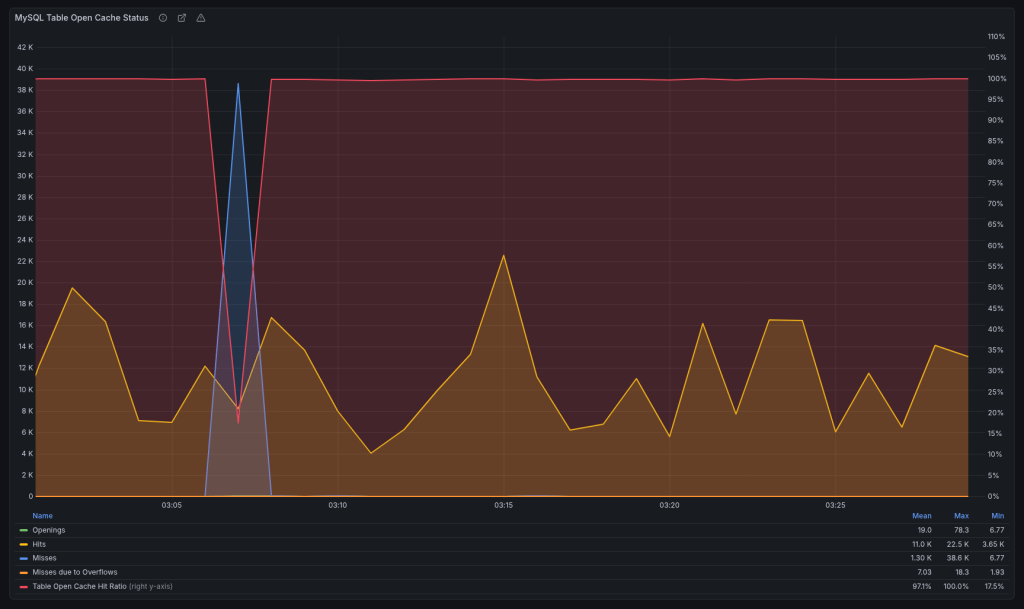
The new version added a parameter table_open_cache_instances which defaults to 8. After upgrading, we would get weird stalls when MariaDB becomes unresponsive for a minute or two when the new instance gets activated. We reverted to the old behavior for the time being:
table_open_cache_instances=1
Planning to debug once all upgrades are done.
Change default charset from latin1 to utf8mb4
MDEV-19123 (Changed in 11.6.0)
I completely overlooked this one. You know how we all sometimes assume stuff “magically” works… We’ve been running latin1 since forever. I upgraded only a single host to 11.8 in order to test, and it made the whole thing harder to debug.

So when someone mentioned garbled translations, it took me a while to figure out why. We route queries based on the web server location, so had to trace the actual requests to find which database server they were hitting. Once it was localized to the 11.8 instance, it was clear what it was.
HyperDB allows us to set charset and collation per server but we never explicitly set them and were relying on defaults, which is why it broke. The data was latin1 but the server converts latin1 -> utf8mb4 on the way out. Updated to latin1 / latin1_swedish_ci to fix.
The Curious Case of the Crashing Server
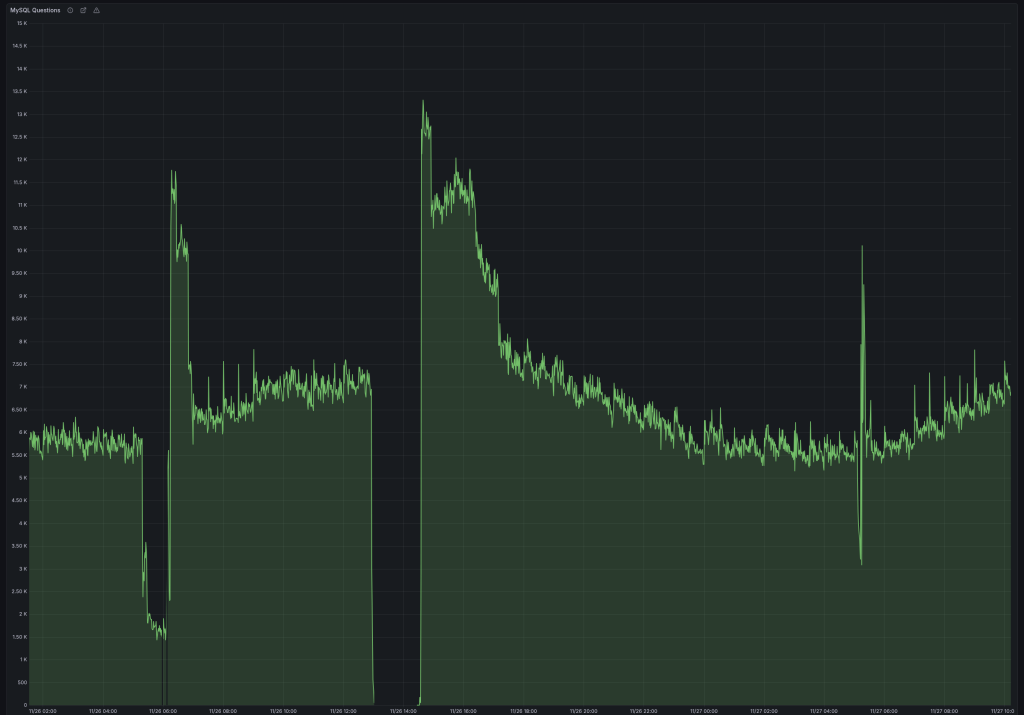
This was a database for an asynchronous job system. Here hundreds of workers claim and report job statuses. In terms of QPS (queries-per-second) it’s averaging ~7000.
It was working fine on 10.1. Or at least it didn’t break. Driven by my previous good experience, I went straight to 11.4 here. And it was a disaster. It would break a few times a week, and the only way to restore it to a working state was a restart. It drove us nuts.
Testing here was also harder, because while we have replicas they don’t get any traffic. They exist as failovers if the primary becomes unavailable due to unforeseen circumstances.
So we started digging through the changelogs, but nothing really stuck out. We tried different InnoDB options. We upgraded the OS to trixie (we’re running Debian on 99.99% of our servers). Looked at perf and strace. Downgraded the DB back to 10.4, as it crashed the least on this one… Tried some kernel options, even upgraded the server firmware, but nothing really helped us until:
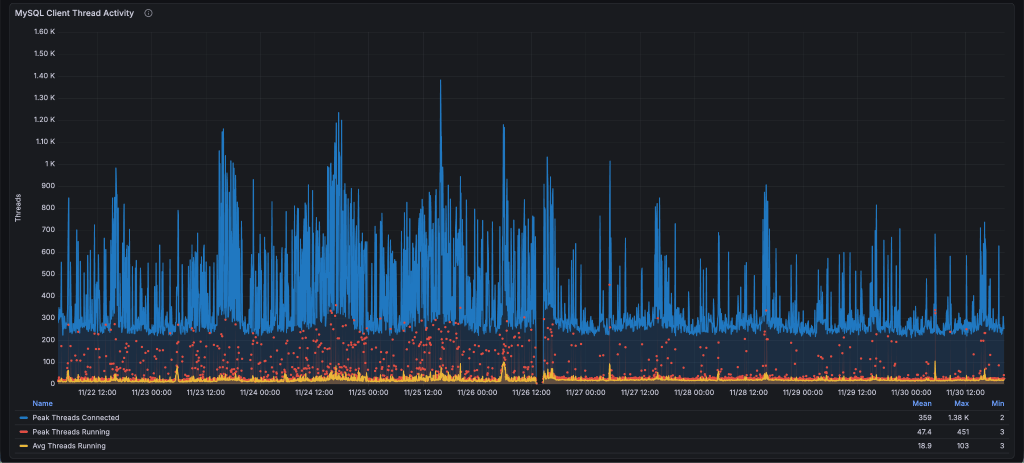
thread_handling=pool-of-threads
This option has existed in MariaDB since 5.5.21, but we never really looked it up. It’s perfect for the job DBs.
Thread pools are most efficient in situations where queries are relatively short and the load is CPU-bound, such as in OLTP workloads.
We got less spiky thread behavior:
Which resulted in stable QPS (notice the difference in dips):
And I/O utilization went down from 40% to 10%. I was sure it was finally fixed.
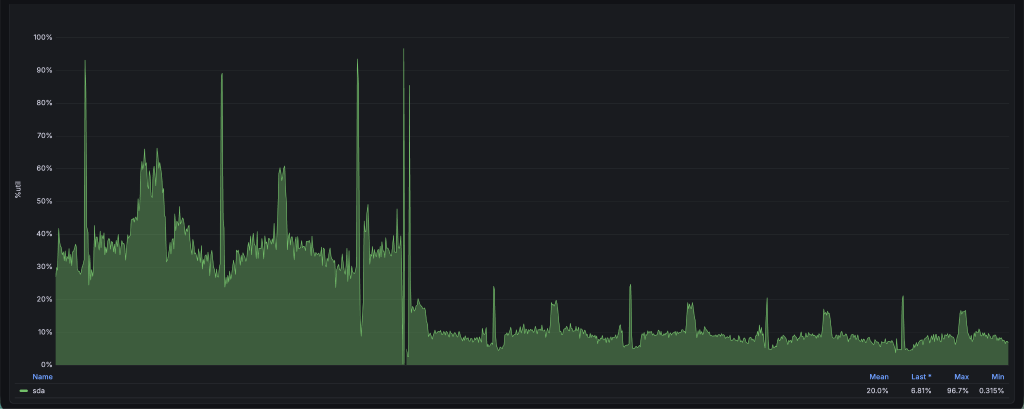
Until it crashed again, but this time after a week. At this point we decided to take a wider look. It might not be MariaDB. Enabled the slow log and started fixing queries running > 1 second.
The first step was adding a compound index over 4 fields which covers almost all queries we run. Previously it didn’t include the updated field.
KEY `idx_index_name_state_updated_blog_id` (`index_name`,`state`,`updated`,`blog_id`).
This got us down to a single slow problem query, which was running close to 60 minutes:
SELECT es_indexable_sites_id FROM es_indexable_sites WHERE index_name = 'global' AND state NOT IN ('inactive', 'permanently-active') AND updated < '2025-10-10 00:00:00' LIMIT 250;
There’s definitely an index to use, let’s check what it’s doing:
  select_type: SIMPLE
        table: es_indexable_sites
         type: range
possible_keys: index_name_updated,idx_index_name_state_updated_blog_id
          key: idx_index_name_state_updated_blog_id
      key_len: 132
         rows: 29052898
        Extra: Using where; Using index
Funny right, going through 29 million rows with an index? That’s how NOT IN works. It has to scan all rows skipping those that aren’t in the wanted state until it gathers 250 as requested. And in most cases there are less than 10 such rows, so it would scan the whole table every time it ran that query, which was once per day. This is a 52GB table.
But our state has only 4 values. Rewriting the query with state IN ('active', 'active-query') gives us a very different EXPLAIN:
  select_type: SIMPLE
        table: es_indexable_sites
         type: range
possible_keys: index_name_updated,idx_index_name_state_updated_blog_id
          key: idx_index_name_state_updated_blog_id
      key_len: 137
         rows: 2
        Extra: Using where; Using index
While it didn’t crash the database, it would drop the QPS to less than 1000, and would never recover unless restarted. We didn’t really figure out why, and we briefly discussed it at the MariaDB Day 2026 in Brussels during FOSDEM, but don’t have an answer as to why it would degrade the performance so badly.
After fixing the query, we upgraded the server to 11.8 and it’s been running stable ever since.
Performance Overview
For our workload this was the general rule: 10.1 < 10.4 < 10.11 == 11.4 == 11.8.
It’s important to have the same configuration before and after (since defaults often change). Also mind the cache when testing. Whether it’s filesystem cache for MyISAM or InnoDB buffer, I’d suggest testing both cold and warm caches to make sure there’s no performance degradations.
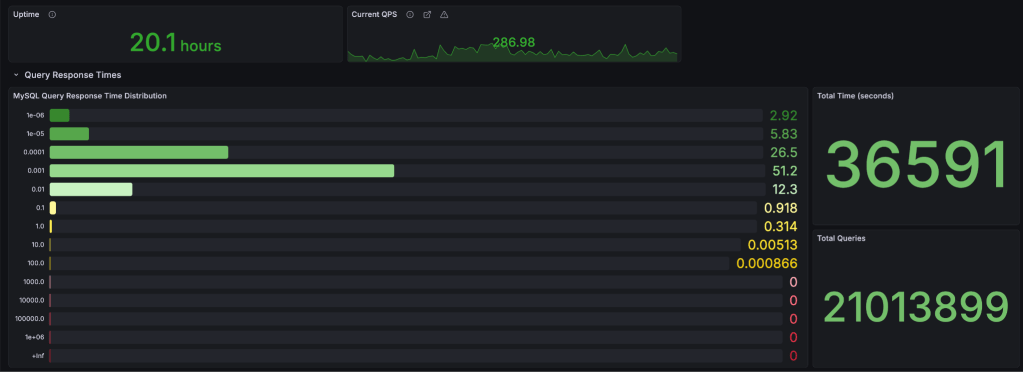
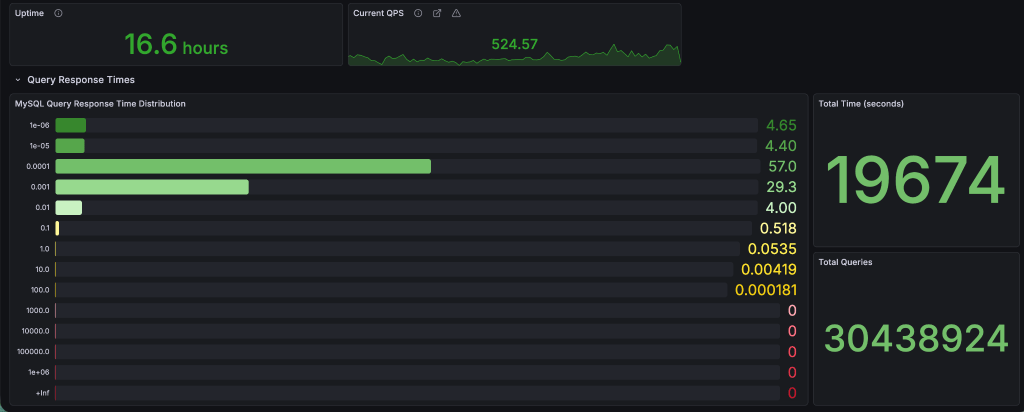
Here’s some actual data from the 5+ million tables servers from above. The breakdown is in seconds (collected from Query Response Time MariaDB plugin, and displayed in Grafana).
MyISAM
10.4
11.8
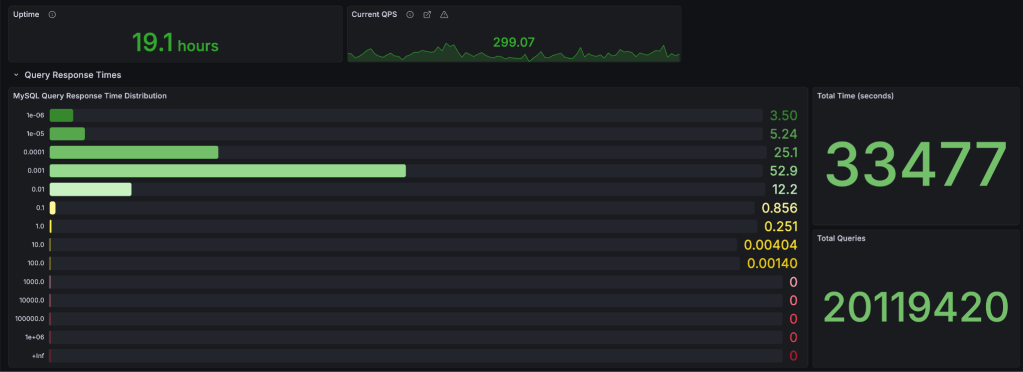
For queries running under-or-equal to 1 millisecond: v10.4 – 86.45% vs v11.8 – 86.74%. This is expected as MariaDB has switched to the Aria engine (crash safe MyISAM) since v5.1, and I don’t think much time has been spent on improving MyISAM. I’m planning to test a few hosts, but that’s for another post.
InnoDB
10.4
11.8
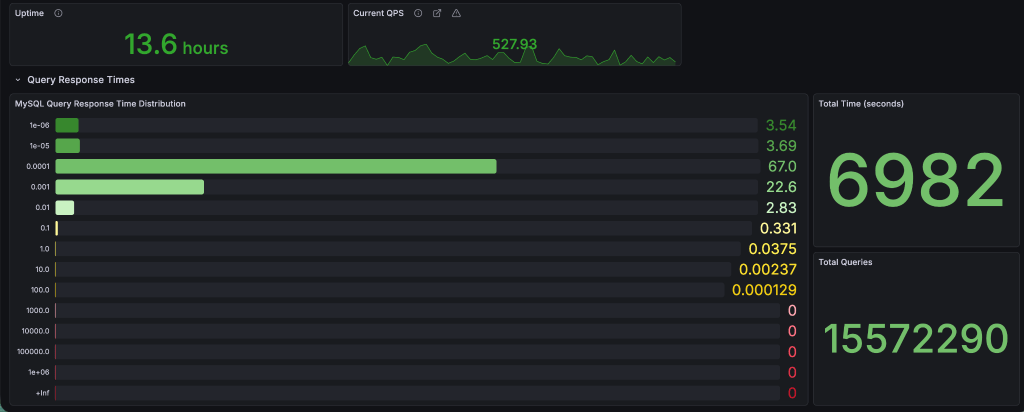
For queries running under-or-equal to 1 millisecond: v10.4 – 95.35% vs v11.8 – 96.83%. That’s a 1.5% difference, with a shift of 10% more queries in the 0.1 millisecond bucket which is quite a nice change. Median query runtime improved from 0.075 ms to 0.067 ms (~10%).
Conclusion
The problems we had:
- 1 major issue with resetting auto-increments (if you’re coming from <10.2)
- 2 default parameter changes (although the
latin1->utf8is major, it’s easy to set back the default to what it was before) - and 1 server crashing (for which we take half the responsibility, because even if it was working on 10.1 there was a query that became bad over time)
Quite minor, as we caught the auto-increment problem on a non-critical server, and it was easy to fix by just running the fixer script after upgrades from 10.1.
The good stuff? Harder to list but:
- faster query execution on InnoDB
- online ALTER TABLE queries
- faster server restarts
- support for vector search
- and many others, but you’ll have to read the changesets starting from 10.1
Can you upgrade 10.1 -> 11.8?
TL;DR: Yes! But…
Always test in a safe environment you can easily revert if it stats breaking. There’s only 10 years of updates between the first releases of 10.1 and 11.8.

