


DevOps is a development methodology that integrates development, operations, and IT teams for enhanced communication and collaboration. While typically used by more traditional software development companies, WordPress agencies that are focused on site development can use many of the same principles to improve processes for happier clients while protecting the integrity of projects.
By properly leveraging DevOps principles, agencies can achieve shorter development cycles and provide faster updates for client sites, which benefits both the client and the agency.
Specific DevOps procedures are not set in stone and they allow for great flexibility. They do, however, abide by a number of principles, including the prioritization of automation, reducing development time, and team collaboration.
In this guide, we’ll provide a full overview of the DevOps methodology—specifically in the context of WordPress agencies. We’ll talk about how it works, why it’s a good system for WordPress, and how to implement it.
Pro tip: If you join an organization-focused program like Automattic for Agencies, you’ll be able to further boost both onboarding and site management workflows with centralized management and access to the best WordPress tools.
What is DevOps?
DevOps is a methodology designed to help software developers collaborate with operations and IT teams within their own company, or even other businesses.
There’s no set, universal DevOps methodology. Having said that, there are some key components that are ubiquitous:
- Collaboration between teams. There should be an open channel of communication between website developers and operations teams. A high level of communication ensures that everyone is on the same page when it comes to updates, what needs to be fixed, what tasks need to be prioritized, and more.
- Automation of repetitive tasks. There are a lot of tasks in site development that can be automated to some extent. That includes setting up development environments, testing, automatically deploying code once it passes those tests, configuring automated monitoring, plugin updates, and more.
- Shorter development cycles. While each deployment may not have major overhauls to pages or functionality, shorter development cycles allow for shorter release cycles. These help demonstrate continual progress to clients and allow teams to hyperfocus on specific goals.
- Short client feedback loops. With shorter development cycles, agencies and operations teams can zero in on the biggest pain points for clients and provide quick fixes for the most important items. This can significantly benefit the client-agency relationship.
How an agency chooses to implement DevOps methodology should largely depend on its goals and team structure. For instance, they may decide to focus on improving communication efficiency, automating unnecessarily-manual processes, providing enhanced levels of security for high-risk client sites, improving the quality of the code they ship for better performance, and more.
Any of these goals can be achieved using DevOps. It’s all a matter of figuring out how to implement the strategy in a way that works best for your agency and clients.
WordPress agencies can implement many of the same principles to respond more quickly to client requests and work more efficiently as an organization. Throughout the rest of this article, we’ll provide advice for WordPress developers and agencies that want to transition to a DevOps methodology.
Why You Should Integrate DevOps with WordPress Development
Most WordPress agency projects can benefit from adopting DevOps principles. Let’s go over some of the reasons why WordPress and the DevOps methodology work so well together.
Enhanced Collaboration Between Teams
In a lot of traditional workplaces, there are clear lines between teams. Developers work with other developers, and the same goes for the operations and IT departments. Collaboration is limited to the occasional meeting or discussing issues over Slack. This approach is often referred to as a “siloed” approach, and it presents a number of problems, such as:
- Workflow inefficiency. Some work may be duplicated or be incompatible with what other teams are doing, automation may be difficult to achieve across teams, and deployments can be delayed due to lack of communication.
- Stifled innovation. When a team is siloed, they may engage in more dogmatic thinking and be less open to input from external sources (including the client).
- Team disengagement. When communication is limited, the resulting breakdown of processes and inevitable increase in conflict leads to teams becoming increasingly disengaged with agency goals and results in lowered morale.
- Reduced quality of work. If teams don’t communicate regularly and efficiently, they are left to make decisions with incomplete information. This can lead to more errors, longer deployment cycles, and dissatisfied clients.
- Lost opportunities. Agencies using a siloed approach can’t pivot as quickly to respond to opportunities as their lead times and development cycles may be too long.
But with DevOps methodology, agencies encourage in-depth collaboration and communication between teams.
In practice, that means developers and operations work together to identify issues, find solutions, and prioritize tasks. Since the teams are not isolated in “silos,” it becomes easier to have a unified vision for the end product.
Businesses can encourage collaboration using tools like Slack or P2, which foster communication and coordination between teams. A business can also implement Agile practices, like daily meetings where workers can share their progress across teams, ensuring everyone knows where projects currently stand.
Faster Development Cycles
A full development cycle takes a team from the planning and initial coding phase all the way to the deployment stage. There’s no standard length for a development cycle. So it can vary a lot depending on the functionality the business is trying to implement and the scope of the project. Especially if an agency is working on multiple projects of widely varying complexity at once, inefficient processes can quickly add up, leading to unnecessary delays and client frustration.
Ideally, these cycles should be shortened as much as possible while still providing high-quality deliverables. Most clients are pressed for time and anxiously await the latest update—especially if it includes essential new integrations to enhance marketing and sales efforts, critical security updates, or important functionality improvements.
Improved Deployment Frequency
Once the development cycle is over, it’s time to deploy the software.
DevOps methodology guides agencies towards smaller, more frequent deployments. This helps with time-sensitive requests and keeps both clients and their site visitors more engaged.
But smaller updates are also often preferred because larger updates are more likely to lead to technical issues—simply because fewer changes have less potential breaking points, but also because small changes can be more thoroughly tested in a shorter period of time.
Faster and smaller deployments can help make life easier for operations and IT teams. For plugin developers, it shows customers that the software is well maintained and under active development, which can help build trust and boost customer retention. For agencies, it communicates a high level of client service and helps those clients achieve better results. This is a huge part of long-term client retention.
Better Product Quality and Client Satisfaction
DevOps methodology leads to better product quality and client satisfaction. Clients tend to prefer shorter release windows and, with more frequent, but smaller, releases, software updates are less likely to cause critical issues.
In terms of product quality, increased collaboration between teams and shorter development and deployment cycles should lead to better releases. Shorter cycles enable teams to incorporate client feedback faster and respond to visitor feedback regarding site errors.
Key DevOps Principles for WordPress
So far, we’ve focused on DevOps principles and benefits in a general sense. Now, it’s time to turn the conversation towards how you can implement these principles with WordPress.
1. Version Control Systems
As a developer, you may already be familiar with the concept of version control systems. These are tools used by development teams to manage the source code of an application and track changes and updates.
Version control makes it much easier for developers to work together on the project’s code. Every development project should implement this strategy.
With version control, developers can track all the changes to code repositories and access those past versions. This system makes it easy to review code or revert to previous codebases if the need arises.
With the right version control system, developers can also create code branches. These enable teams to work on different tasks and then merge the resulting code into the primary branch when it’s ready for deployment.
One example of a version control system that supports all those features is Git.
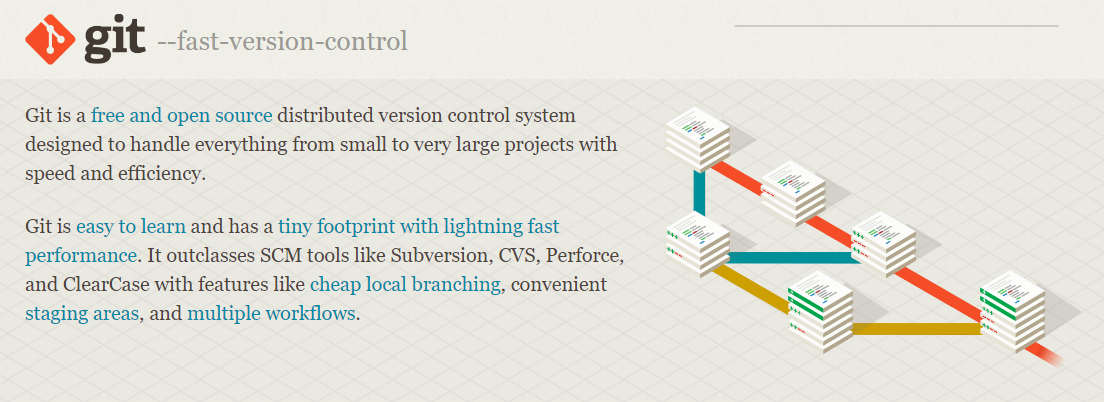
Using version control is an excellent way to instill the principles of accountability and collaboration within the development team. It’s also a critical system that should help streamline development cycles by making it easier to update the main codebase.
Git can seamlessly integrate with WordPress. This enables you to manage version control for custom themes and plugins, as well as streamline development and collaboration.
Some hosting providers like WordPress.com and Pressable offer Git integration, allowing you to push code changes directly from your Git repositories to your WordPress sites. This feature can help you deploy code more easily and streamline your workflow.
2. Continuous Integration and Continuous Deployment (CI/CD)
CI and CD are DevOps principles. With CI, a developer is encouraged to merge their work frequently. This means there are more commits with smaller changes, but it’s a great way to continuously test the code as it progresses, using automated systems.
If the tests reveal issues with the code, developers can quickly adapt and make the necessary fixes. With CD, the changes that make it through the code-testing workflow will move on to production automatically. With DevOps, there’s sometimes no manual code review step before deployment, since the tests the team sets up should catch any potential issues.
All of this is only possible with shorter development cycles. Attempting to test and deploy large changes to the codebase after long periods of work will typically lead to a lot more instability in the final product, compared to a DevOps approach.
3. Infrastructure as Code (IaC)
Implementing IaC principles means treating infrastructure deployments and configurations as teams would code, focusing development cycles on creating, testing, and deploying server configuration files. Then teams can continue optimizing configuration files over multiple cycles.
One of the main benefits of IaC principles is better scalability. With the right configuration files and IaC tools, teams can easily deploy large-scale applications quickly without having to rely on clunky web interfaces.
4. Automation in WordPress Development
Automation is one of the key principles of DevOps practices in WordPress development. The nature of WordPress projects makes it easy to automate several types of complex tasks, which can save development teams a lot of time and unnecessary work.
Testing is one of the big aspects of WordPress development that can be automated to a large extent.
A good example of this is unit testing—a test to ensure that functions return the expected results.
Another is visual regression testing. This uses automatically taken screenshots to monitor an application for visual changes, which may stem from errors.
In terms of building and deployment, WordPress developers can automate tasks like CSS preprocessing and code minification using tools like Gulp. Developers can also configure workflows to automatically create zipped versions of plugin builds to share them quickly.
When it comes to deployment, you can automate the process of pushing changes from a staging environment to a production site. This is only advisable if there’s extensive automatic testing involved. Without that key DevOps principle, automated deployment can lead to critical issues with updates.
Overall, DevOps suggests automating as many repetitive development processes as possible. If there’s a simple development task that you can automate without security issues, then you should do so.
5. Monitoring and Logging
Regular monitoring of applications, databases, and web servers is a critical component of the DevOps process. A good monitoring tool should automatically notify you of specific events to help you detect issues and resolve them without delay.
There are monitoring tools that focus on performance and others on security. Both solutions are vital in a WordPress development environment, as no business wants to ship products with security issues.
For an optimal DevOps implementation, businesses should consider using monitoring tools that offer central databases for managing multiple applications. In an agency environment, WordPress developers can use these kinds of tools to monitor site performance for clients, as well as scan for security issues.
How to Prepare for DevOps Integration in WordPress
Before implementing DevOps practices in WordPress, there are some steps you can take to reduce friction.
Integrating DevOps methodology can be a full cultural shift, whether you’re a solo developer or run a large agency. Therefore, you’ll want to pave the way to a smooth transition.
Audit Your Current WordPress Development Workflow
In most cases, implementing DevOps methodology will mean changing the way you normally do things.
To make this process simpler, we recommend consulting directly with the people you’re collaborating with and documenting their current workflows.
This means going over the following points:
- How does the team currently plan and prioritize new features or updates?
- What development process does the team use and how do they review code and test it before deploying it?
- What types of tests does the development team run, and are they automated?
- How does code deployment work, and is it automated in any way?
You’ll also need to consider tasks specific to WordPress. These may involve WordPress optimization, site backups, update practices, and more.
Identify Bottlenecks and Inefficiencies
The goal of documenting the entire WordPress development process is to understand how it currently operates, from planning to deployment and beyond. With that data in hand, you’ll be in a better position to implement DevOps methodology and begin to streamline those processes.
The way to do this is to identify inefficiencies in the existing WordPress development workflow. These may include things like:
- Slow or erratic development cycles. Development cycles can’t always be uniform. Even so, properly managed development teams should be able to mostly meet their targets. Erratic development cycles and deployments can point toward communication issues or poor resource management.
- Inconsistent use of version control. This is critical for any semi-complex WordPress project (and development projects in general). Poor or inconsistent use of version control systems can suggest that the development team isn’t following best practices.
- WordPress performance issues. Deploying a WordPress product, like a plugin update, should not negatively affect customer site performance. If updates to a business’ WordPress product negatively impact customers, that’s due to a problem with its development workflow.
- Gaps in product documentation. Product documentation is critical not only for end users but also for internal teams. Documentation helps bridge the gap between developers and operations teams, who might not necessarily speak the same language (from a technical perspective). Poor documentation is a clear sign of poor development practices.
A “bottleneck” can be any part of the development and deployment cycle that is causing problems. These problems can then be targeted using DevOps methodology.
Evaluate Team Structure and Skill Sets
If a business wants to implement DevOps methodology successfully, it stands to reason they’ll want to pair workers with the tasks that they excel in. To give an example, some developers might be better when it comes to testing applications, but they have to spend most of their time working on debugging.
DevOps methodology encourages businesses to assign developers and operations team members to the tasks that they’re good at. This will contribute toward shorter development cycles since efficiency should rise thanks to a reorganization.
This reorganization can mean changes to the current team structure. DevOps encourages a more collaborative workplace with fewer top-to-bottom leadership structures. Many developers can thrive under that kind of work culture but it’s a decision for each agency to make.
Choose the Right Tools and Hosting Environment
A significant part of adopting DevOps methodology is choosing the right tools for the job.
Earlier, we mentioned how tools like Jira and Slack can help improve team communications, which is one of the pillars of DevOps. Git is another example. It’s a version control system that’s widely used by developers to maintain codebases.
For WordPress, you can use plugins to automate parts of the development workflow. For instance, Jetpack VaultPress Backup enables you to automate essential backup procedures.

This backup solution saves every change made to a site in real time. It also stores backups in an off-site location so that, if the server goes down or experiences a security threat, your websites are still safe.
The choice of web hosting provider can also facilitate the integration of DevOps methodology with WordPress development.
Pressable, for example, has a ton of built-in automation features that can improve your DevOps process. It offers auto-scaling, a plugin update scheduler, performance reports, smart WordPress staging environments, and more. Pressable also helps navigate businesses through a secure deployment process using GitHub.
How to Integrate DevOps with WordPress Development
With the preparation out of the way, the next step is to integrate DevOps into your WordPress development workflow. We’ll discuss several ways you can do this, although experiences and requirements can vary from one developer (or agency) to another.
Set up a Version Control System
We’ve established that version control systems are critical to any serious development project. Businesses with teams working on WordPress development or creating products for the CMS should adopt a system and use it as the core of their codebase.
One of the most popular options for software and WordPress development is Git. This is an open source version control system, which you can leverage through platforms like Github.
Other version control systems popular among developers include Mercurial (for handling large projects), AWS CodeCommit (which is great for its collaborative features), and Azure DevOps Server (another great collaborative option).
The decision of what version control system to use can set the tone for development projects.
You’ll want to coordinate directly with the client to choose a system that meets their needs and facilitates a smooth workflow.
Establish and Document a Development Workflow
DevOps methodology calls for specific fundamentals like short development cycles and deployment times. For many developers, that means doing a complete overhaul of existing workflows.
Developer teams will have to switch their mindset toward focusing on smaller, incremental updates. Massive updates or feature overhauls should be few and far between as the developers and operations teams are constantly improving products.
Developers who want to use a framework for developing a DevOps workflow should look towards Agile methodology. This is an iteration-based project methodology that emphasizes short cycles, breaking down complex projects into digestible tasks. It also prioritizes frequent project meetings and self-reported progress tracking.
Agile methodology is a great representation of DevOps. More importantly, it pairs fantastically with development and operational tasks. Businesses can use Agile fundamentals as a starting point to develop a custom workflow and document it for internal purposes.
Automate Build and Deployment Processes
Automation is one of the core tenets of DevOps. If there’s a repetitive process within the development workflow that can be automated safely and at scale, it should be automated. This enables you to spend more time on actually building and improving products.
When it comes to WordPress development, you can automate several build and deployment processes. Some examples include:
- Using continuous integration (CI) tools. CI tools can integrate with version control software to automatically integrate changes to the code based on the settings you configure. Some examples of tools with CI functionality include Jenkins and GitLab.
- Unit testing. Businesses can automate testing for functions in plugins and themes using frameworks like PHPUnit.
- Using containers for deploying dev environments quickly. Containers can enable development teams to quickly share and set up environments. This saves a lot of time in replicating environments and it’s therefore something that should be automated.
What processes to automate should be largely determined by your findings while developing and documenting a workflow. Any process that needs to happen within every development cycle, like deployment and testing, should be automated to the fullest extent possible.
Often, this means integrating third-party solutions that can handle the tasks effectively and safely.
Implement Infrastructure as Code (IaC)
IaC is a DevOps practice that aims to streamline infrastructure deployment and configuration. That means developing processes to automate managing and provisioning servers, databases, and networks. Basically, it covers anything a WordPress application needs to function.
In practice, that can mean deploying a cloud server using a configuration file instead of doing it manually. The IaC approach enables the development team to use coding practices for developing and maintaining these configurations.
Plus, implementing IaC makes it easier to deploy consistent development environments. It’s also ideal for deploying large infrastructure requirements.
In real-life situations, a development team can use a service like AWS CloudFormation to automatically deploy complex Amazon web services (AWS) infrastructures, test them, and scale them as needed. All of that using only JSON and YAML templates for the configuration files.
Other popular IaC tools include Terraform, Ansible, and Google Cloud Deployment Manager. The latter is ideal for Google Cloud users and projects. It enables you to define and manage resources on this platform using YAML, Python, or Jinja2 templates.
Meanwhile, Ansible and Terraform can automate WordPress installations, configurations, and updates across multiple servers.
IaC practices are particularly important for WordPress development projects that may require quick scalability. This makes DevOps methodology a great match for SaaS products (to use an example).
Set up Monitoring and Logging for WordPress Sites
Setting up monitoring and logging for a WordPress site in the context of DevOps means configuring processes to monitor its health and performance, as well as keeping an eye on security threats. Ideally, these processes should be automated.
Application performance functionality is one example of automated monitoring tools that businesses can leverage for WordPress development. Quality web hosts offer application monitoring tools that WordPress developers can use to check PHP execution times, load times, caching issues, and even database query performance.
The data compiled by these monitoring and logging tools can be invaluable to the development and operations teams. Developers can use that data to look for ways to improve performance, while the operations team can study the impact that these issues have on customers.
How to Enhance your DevOps Workflow with Automattic for Agencies
Automattic for Agencies is a partnership plan that provides WordPress agencies with access to tools and services that bolster new client onboarding, streamline ongoing operations, and improve site performance, all while contributing to healthier agency profits.
As an Automattic agency partner, a business can get discounts on tools and hosting plans, access to support, and a centralized dashboard, with team collaboration capabilities, for managing client projects.
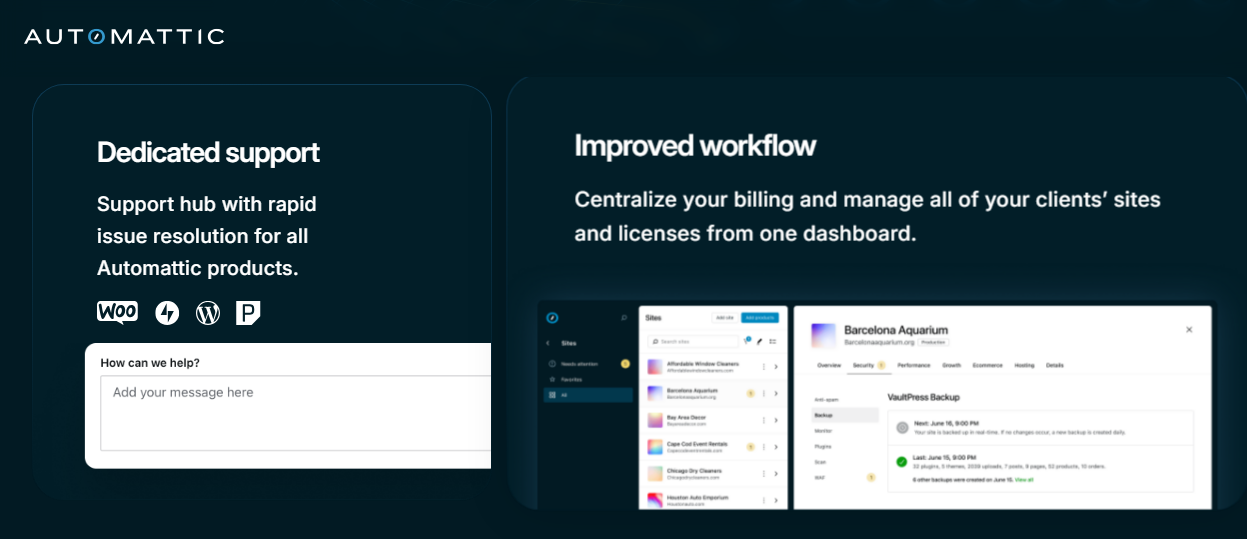
The centralized dashboard also enables you to manage product licenses and leverage automation tools like the Jetpack suite. Jetpack Security, which is part of the suite, includes tools for automated real-time backups and malware scanning among other things.
When it comes to new client onboarding, Automattic for Agencies allows organizations to put together custom bundles of Automattic products and forward checkout straight to the client to handle payments directly. This gets projects up and going faster while eliminating a billing and cash flow hiccup for agencies.
You can learn more about Automattic for Agencies by visiting the official program website. Any agency can apply to join the program and there are no signup costs involved. Benefits, however, will vary based on membership tier.
Are you ready to improve your agency’s workflow while generating recurring revenue from the product licenses you already recommend every day? Get started with Automattic for Agencies!

 Automattic