


Your Automattic for Agencies account now connects to Claude, ChatGPT, Cursor, and other AI tools through our new read-only MCP. We deliver your account and program standing straight into your preferred AI tool, ready to answer a question on demand, deliver a recurring report on your schedule, or power a living artifact your team works with.
What is MCP?
Model Context Protocol is a popular open standard that lets an AI tool request information from an outside service, with your permission and inside limits you set.
Ours gives your AI tool a direct line to your Automattic for Agencies account, so it can look things up for you instead of you needing to visit the dashboard. It’s free with your account and takes a few minutes to connect.
How it benefits your agency
With our MCP, you can better understand opportunities in the program you might not be taking advantage of, or discover anything that needs your attention. We deliver the data and the answers you need from your account. You shape them around the workflows you’ve already built.
It can cover a quick answer between meetings, a report that arrives every Monday morning without you asking for it, or creating a tailored dashboard your whole team uses.
Enable MCP in 4 easy steps
In your dashboard, go to Resources and Tools, then AI and MCP:
- Enable MCP access and choose which permissions to grant.
- Copy the server URL for your AI client.
- Authorize the connection with your Automattic for Agencies account.
- Start prompting.
Types of information you can access

To get value right away, there are three starter prompts inside the portal you can paste right into your AI tool. One gives you a program health snapshot covering tier, earnings, and billing. One scans your whole portfolio and groups every issue it finds. One sets up a recurring weekly report. Feel free to reshape them to get the information that’s most useful to you.
More example prompts:
- “What can you tell me about my Automattic for Agencies account?”
- “How close am I to the next tier, and what do I need to get there?”
- “What benefits of Automattic for Agencies am I not taking advantage of?”
- “What have I earned across referrals, WooPayments, and migrations, and when is my next payout?”
- “What renews in the next 30 days?”
- “How many client referrals are pending or need attention?”
- “Which sites of mine have active threats or vulnerable plugins right now?”
- “What PHP and WordPress version is every site in my portfolio running?”
Put your data to work on your terms
Answers on demand: Ask a question the moment it comes up and get a response from your account in real time.
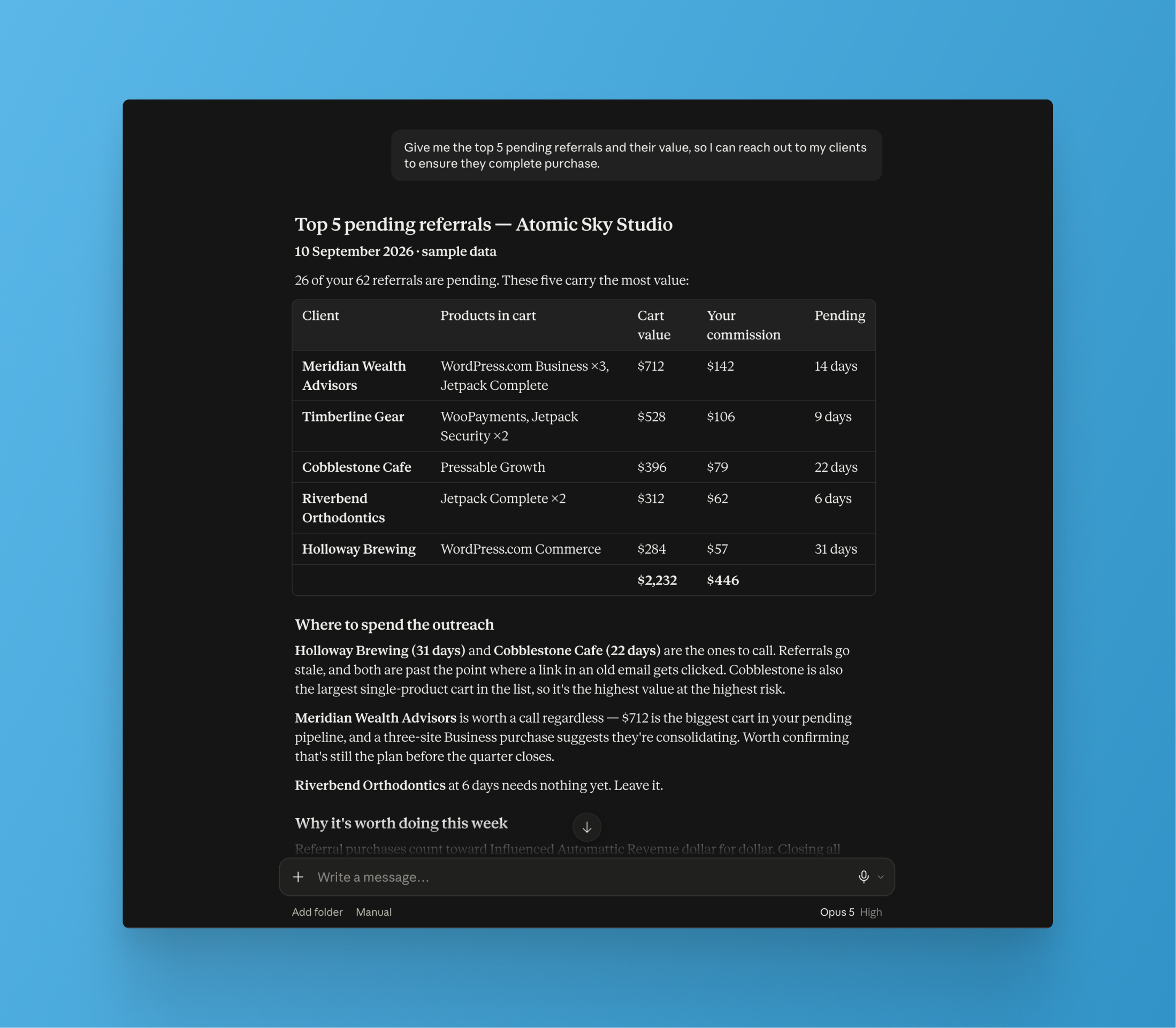
Scheduled reporting: Ask for a recurring digest of earnings, portfolio health, upcoming renewals, and more, delivered to Slack or email on whatever cadence suits you. Agencies in our beta replaced a Monday morning routine of several dashboard checks with one report.

Living artifacts: Create a custom dashboard with the information that’s most important to you. Everything arrives through your AI tooling, so it also fits into other AI-created dashboards you may already have.

Documentation: Our MCP pulls from our knowledge base as the source of truth. Ask “what counts as Influenced Automattic Revenue?” or “how do referrals work?”
Give us feedback: Did you find a bug, or perhaps have an enhancement request? Tell your AI tooling to deliver feedback to our team via the MCP.
Customer story: A portfolio-wide audit with a single question
Team Colab ran into a problem plenty of agencies will recognize. An outdated version of PHP was breaking their base WordPress theme, and determining which sites ran which PHP version meant checking them one at a time, across more than one host. Tracking down issues like this can often become very tedious.
“…I asked the same thing of the MCP and it gave me a super quick response with PHP versions of sites on Pressable AND included any sites on my account that had Jetpack instances [including sites hosted elsewhere]. That would have saved us a ton of time on our audit. I gave this update to our leadership team and they were all about it.”
— Ralph Otto, CPO
Jetpack and our MCP are what made that possible. Every site with Jetpack enabled reports into your Automattic for Agencies account, so the MCP diagnosed PHP versions across Team Colab’s entire portfolio in one pass, including their sites living on other hosts. No single view of that existed for them before, which is why finding it by hand had taken so long.
A note on site health: those answers come from Jetpack, so a site needs Jetpack connected on a plan such as Security or Complete, with backups and scanning turned on. Host with Pressable through Automattic for Agencies and Jetpack Complete is free on every site. See details. If you have sites with WordPress.com Business plans through Automattic for Agencies, this functionality is built in.


