


When onboarding a new client, it’s important to think about a variety of factors beyond just signing contracts and sending over relevant files. You’re not just creating deliverables for clients — you’re developing a relationship. Success will require a deeper understanding between both parties, consistent and clear communication, and tangible ways to track and analyze project timelines and product performance.
A successful onboarding process builds trust, sets expectations, and provides a predictable framework that sets the tone for future collaborations. It can also help bridge any gaps that might occur as a result of separate sales and operational teams. A disorganized “handoff” from the sales team to an account manager or creative group charged with completing the work can result in miscommunications and is often jarring or confusing for clients.
To help agencies create a strong foundation for each new client relationship, we’ve put together this agency/client onboarding checklist.
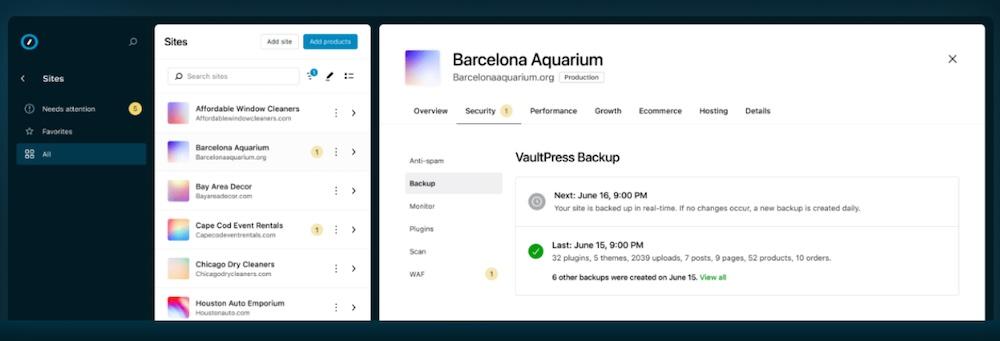
The most powerful tool for WordPress agencies: Automattic for Agencies provides a streamlined way to offer elite WordPress hosting, plugins, and services to clients while improving operations and bolstering income. Work more efficiently with site management from a central dashboard, bill clients more intuitively with the Build-a-Cart Referrals feature, and collect commissions for using the top-tier tools you already recommend to clients. Learn more here.
1. Perform in-depth research on the client
If you’ve closed a new deal, you’re probably already familiar with your client’s basic needs. Perhaps they even outlined a good bit about their market position, challenges, and project objectives.
Now it’s time to go a bit further and take an outside, independent view. How the client sees themselves may be much different than a third-party perspective. Wrestling with these differences is key to not only creating an end product that the client loves, but creating one that the market understands and loves as well.
Begin by taking a fresh look at the client’s current website and writing down your interpretation of their mission and vision, as well as your perception of their products and company size. Compare this to how the client talks about the same subjects to identify how you can better present their business to site visitors.
Then, zoom out even further. Look into the industry at large, including market size, growth trends, and potential developments. These factors make it easier to anticipate the challenges and opportunities clients face.
Getting a grasp on key competitors helps, too. Assess their strengths and weaknesses, and determine what makes the client stand out amongst them. What seems just the same as everyone else?
Beyond visiting your client’s and competitors’ sites and social media, you’ll likely want to invest into some more advanced tools. Crunchbase works well for finding out company information, funding rounds, and market trends. Search engine research tools — ahrefs, SEMRush, Moz, and others — can provide fairly in-depth details about your new client’s current standing in the market and that of key competitors.

2. Mail a personalized welcome package
When bringing on a new client, you should also send over a personalized welcome package to make them feel valued from the outset.
A welcome package should contain key project details, like an overview of the team members working on the account, the project timeline, and any immediate next steps. This helps set clear expectations and gives the client a roadmap for what’s to come.
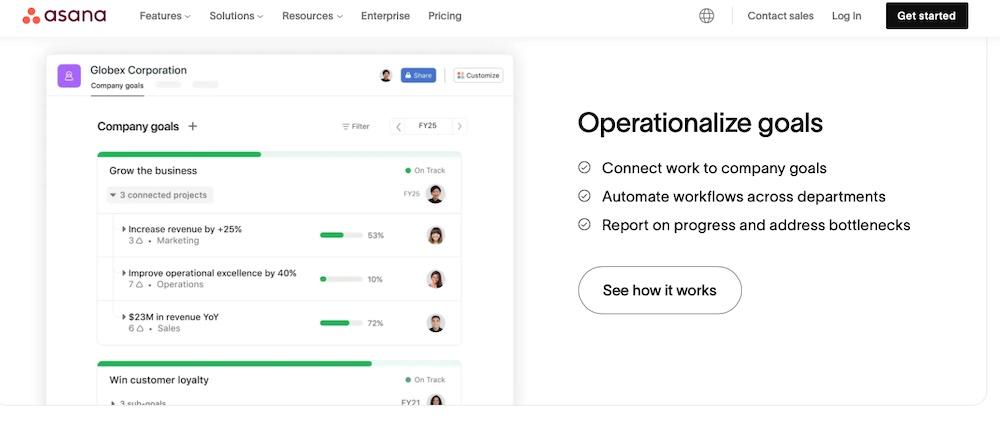
This is also an opportunity to explain the agency’s workflow and the tools that will be used. If your team uses project management software like Asana or Trello and communication platforms like Slack or P2, now is the time to introduce your clients to them. Offering tutorials or access links will help them get used to the tools right away.
And don’t forget to include a handwritten note or a personalized message that addresses the client by name and acknowledges their specific needs or goals. Adding a personal touch shows that you’ve put thought into the package and that it’s not some generic thing.
Each welcome package doesn’t have to be entirely bespoke, though. In particular, if you work with a high volume of clients, you might create pre-packaged onboarding kits with various swag, templated instructions, and onboarding docs that are largely the same. Then, you can include branded shipping materials, leaving space to add personalized items unique to each client.
3. Send a client onboarding questionnaire
Sending a client onboarding questionnaire is essential for understanding the client’s specific needs, preferences, and expectations. And it ensures that an agency knows exactly what the client’s goals are from the start.
But wait, shouldn’t you already know a lot of this from the sales pitch? Yes and no. Depending on the scope of the pitch, you may not have gotten very deep into details. And even so, this is your chance to ensure that the handoff from sales to operations doesn’t result in a fatal miscommunication.
Plus, since the sales process can sometimes be unpredictable and less linear, having a standardized questionnaire gives your operations team a consistent base to work off of for every project.
But instead of annoying your new client by asking the same questions as your sales team, you might pre-fill answers to some of the things you already know. You might say, “We’ve filled out part of the questionnaire based on our understanding of your current situation. Did we get it all right? Please point out what we got wrong or expand on our understanding.”
What’s included in the questionnaire will depend on the industry and the client but generally, it’s good to gather details about things like:
- Target audience
- Brand voice
- Project goals
- Staff capabilities and contacts (Do they have internal programming, marketing, and sales teams that your agency will work directly with?)
- Specific KPIs they want to focus on
The questions should be designed to help fully understand the client’s business and any challenges they foresee.
While it’s important to gather detailed information, the questionnaire should be thorough, yet not overwhelming. Focus on key areas like project scope, timelines, communication preferences, and any existing materials the client wants to share. A well-structured questionnaire helps set clear expectations and avoids scope creep.
A mix of open-ended questions and more structured options like yes-or-no or multiple-choice is helpful, too. Open-ended questions allow people to express their thoughts and provide insights that aren’t captured otherwise, while specific questions help quickly gather essential data.
4. Collect all necessary logins and access
Another thing to think about when bringing on a new client is providing logins and access credentials for management platforms and communication tools. But this goes both ways. If the client has an existing website, they’ll need to provide access, and the agency will likely need to manage migration.
For Automattic for Agencies partners, this process is streamlined. Partners receive professional migration support, alongside flexible billing and a centralized dashboard. Plus, there’s an exclusive, dedicated support hub with rapid issue resolution for all Automattic products.

Begin this information sharing process by listing all the access points the team will need, like website credentials, hosting accounts, social media logins, analytics tools, CRM systems, and any third-party integrations.
Then, use secure methods for sharing credentials. Avoid unsecured channels like email. Instead, use password management tools like LastPass and 1Password. These tools make it easy to share access securely without anyone revealing passwords directly.
Work with the client to determine who needs access to different tools and platforms. Everyone should not have the same access. Set up roles and permissions according to each team member’s responsibilities to minimize security risks.
5. Assign a dedicated onboarding specialist
Assign a dedicated onboarding specialist to ensure nothing is missed during this process and that clients feel supported and valued right from the start.
To do this, select someone who is well-versed in the agency’s processes, has strong communication skills, and can effectively manage client expectations. This person will serve as the primary point of contact.
The onboarding specialist should then work closely with the client to understand their specific needs, goals, and challenges. The specialist can then communicate this information back to the team.
This doesn’t have to be reserved for just the onboarding process. Continuing to offer support, addressing issues that arise, and ensuring the client feels comfortable and confident as the project progresses is essential to a winning client management strategy.
6. Conduct a kickoff meeting with the client
A kickoff meeting is a pivotal step in client onboarding, too. And it can set the tone for the entire project. A good meeting takes all the data gathered during the information-gathering steps and presents it to the client and the agency team to make sure everyone is fully on the same page.
It also provides an organized way to introduce new agency team members to the client or officially pass things off between teams.
To do this right, create a detailed agenda for the big meeting covering all essential topics like introductions, project scope, timelines, communication preferences, and key deliverables. Share this agenda with the client ahead of time to help them prepare and to ensure the meeting stays on track.
Once in the meeting, introduce all key team members involved in the project, and invite the client to do the same with their team. Then, clearly articulate the project’s goals, scope, and key milestones to the client.
Use this time to ensure there’s a shared understanding of what success looks like, addressing any potential challenges upfront to prevent scope creep and manage expectations effectively. This also gives the client a chance to interject with revisions or clarifications.
Go over the project timeline at this point and identify when key deliverables can be expected.
Then, double check preferred communication methods and set expectations for response times. Determine how often meetings or check-ins will occur and clarify who will be responsible for different aspects of communication to avoid misunderstandings.
At the end of the meeting, be sure to leave time for the client to ask questions or raise concerns.
7. Hold an internal meeting to align on the project
After the client kickoff meeting, hold an internal meeting to discuss what was learned and to put together action items. It doesn’t need to be elaborate, but it should include everyone who will be involved on the client’s project.
Start by recapping the main points from the client kickoff meeting, focusing on the client’s goals, expectations, and any specific requirements they’ve shared. Be sure to clearly define each team member’s role and responsibilities within the project as well. Assign specific tasks and make sure everyone understands their part in the overall project plan.
Go over the project timeline in detail. Point out major milestones, deadlines, and dependencies. Address any potential bottlenecks early and adjust the timeline if necessary. If more information from the client is needed before moving on to the next step in the project now is the time to figure that out — not right before it’s due.
Then establish how the team will communicate internally about the project, including preferred tools (like Slack or project management software) and meeting schedules. Decide on the frequency of internal check-ins and ensure that everyone knows how to escalate issues if they arise.
8. Create a detailed project journey and timeline
The next task is to create a roadmap of sorts that details how the project will be carried out (and when).
Break the project down into clear, distinct phases. Each phase should include specific tasks and milestones that need to be completed before moving on to the next. And set milestones for each phase so progress stays on track. Assign realistic deadlines to these milestones to keep the project on schedule, accounting for potential delays.
Also clearly outline what deliverables are expected at each stage of the project. Be clear about the format, content, and criteria for acceptance, and communicate these with the team and the client.
Mark dependencies clearly along the timeline. This gives your client plenty of time to provide whatever information is necessary well before that portion of the project is due.
Plan for regular check-ins and feedback loops, too. And allot enough time for the client to review what’s been completed and provide input.
9. Establish reporting metrics and schedule
Set clear reporting metrics and a consistent schedule to keep the agency and client informed about project progress.
To do this, determine the most relevant key performance indicators (KPIs) that align with the client’s goals. These could be metrics like website traffic, conversion rates, social media engagement, return-on-investment (ROI), or other project-specific deliverables. Use what makes the most sense for the client.
And be sure to use tools that accurately track and report on the selected KPIs. Platforms like Google Analytics can aggregate data into a single, easy-to-read format. And these reports can be easily exported to different specifications.
If the client is in the ecommerce space and relies on WooCommerce, making use of the built-in analytics helps keep tabs on performance. WooCommerce support is included in Automattic for Agencies as well.

Don’t just focus on the numbers, though. Add qualitative insights to these reports. Explain what the metrics mean, highlight any significant changes, and provide recommendations for next steps. This context helps the client understand the data and make informed decisions.
And lastly, as the project progresses, revisit and adjust the KPIs if necessary. If the client’s goals evolve or new challenges arise, tweak the metrics to ensure they continue to provide the information that’s needed.
10. Provide a client portal that’s genuinely useful
A client portal offers a base hub for communication. But customizing this to your client’s needs can improve things even further. Yes, it takes more time upfront, but it can be well worth it.
To do this, make the portal a one-stop shop for all project-related information, including contracts, timelines, deliverables, progress reports, and invoices. Centralizing these documents means clients can easily find what they need without having to dig through emails.
Incorporate features like live chat, direct messaging, and real-time notifications to keep clients informed of any updates or changes as they happen. Integrating third-party communication tools to keep everything seamless is a smart move, too. This reduces the need for back-and-forth and helps address questions or issues promptly.
And if an agency uses project management software like Asana, Trello, or Monday.com, consider integrating these directly into the portal as well.
While Automattic for Agencies isn’t intended for creating a client-facing portal, it can certainly be used as a jumping off point for managing client billing, sites, and service licenses all from one place.
11. Establish real-time communication channels
We’ve mentioned this step in passing already, but it warrants its own dedicated effort. Establishing real-time communication channels is a must for keeping interactions efficient and effective. Tools like Slack and Microsoft Teams make it so much easier to keep workflows moving along.
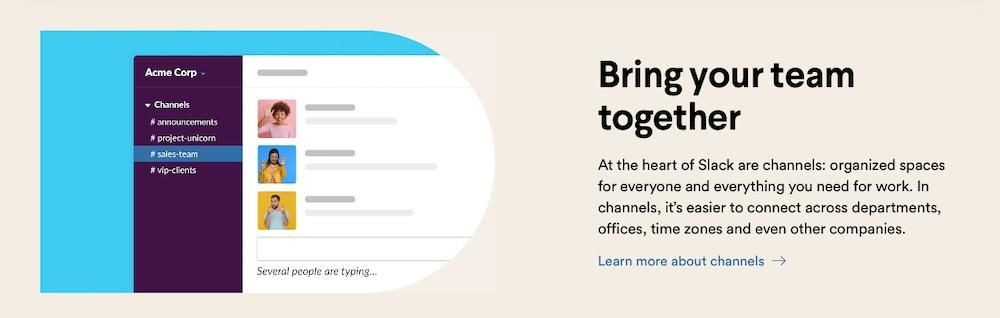
Once you’ve selected a platform, create specific channels for different aspects of the project. Set up separate channels for general updates, deadlines, client feedback, and technical support. This keeps conversations focused and makes it easy for team members and clients to find relevant information quickly.
Also set clear guidelines on how and when these tools should be used at the outset of the project. Define expectations around response times, appropriate hours for communication, and the types of messages that should be sent.
Do provide training and support for these tools as well. Not all clients will be familiar with the chosen communication platform, so help them get comfortable. include this “getting started” type of information in the onboarding welcome package.
12. Get client sign-off on goals and deliverables
Getting client sign-off on different goals and deliverables throughout a project ensures there’s no workflow interruptions. Rather than waiting until the end, securing approval at key stages ensures the project stays on track.
To do this effectively, start by breaking down the project into smaller phases, each with its own set of goals and deliverables. After each phase, present the deliverables to the client.
During these sign-off points, encourage the client to ask questions and provide feedback. This helps catch any potential issues early and gives space to make adjustments before moving on to the next phase. It’s also important to document these approvals, as they serve as a record of what’s been agreed upon and can prevent scope creep or disputes later on.
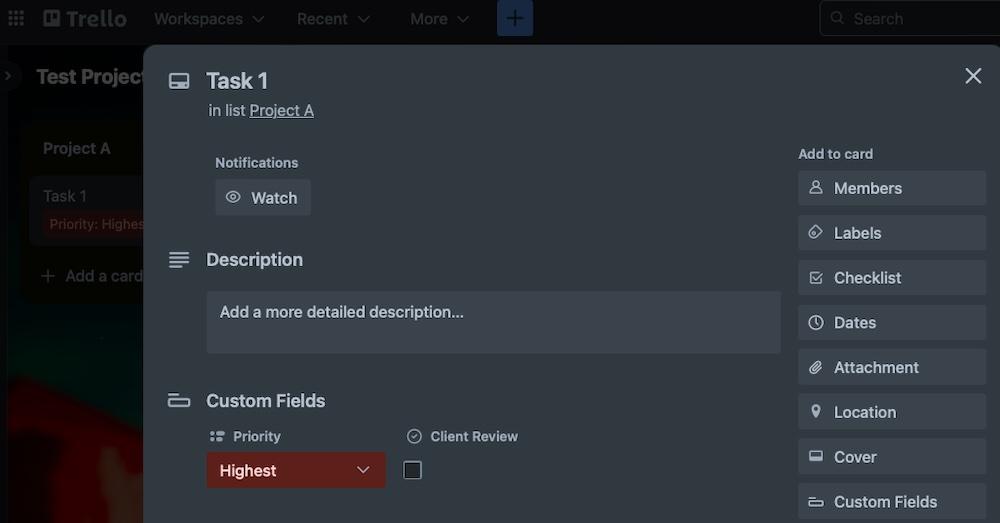
Build this tracking process into the project management platform. For instance, in Trello, it’s possible to create a board for a project and create cards for each deliverable. Add a checkbox to the card to indicate the client has completed their review and approves of the step.
13. Identify quick wins to build confidence fast
Delivering quick wins early in a project builds client confidence and sets the tone for the relationship. These are small, easily-achievable tasks that offer immediate value and show off an agency’s capabilities.
To identify these opportunities, start by pinpointing the client’s most pressing needs. Focus on areas where the team can make a swift impact, like optimizing a process, providing an action plan, or completing a small task ahead of schedule.
Look for low-hanging fruit — those quick optimizations or content updates that require minimal resources, but deliver tangible results.
An example might be to improve a landing page’s conversion rate or address an SEO issue that can quickly show progress once fixed. Once these quick wins are achieved, be sure to highlight them for the client right away. This isn’t bragging. Instead, it’s showing the team’s ability to deliver wins early on. The client will trust the team more and will gain confidence that the project is on the right track.
14. Integrate rigorous QA checks to all deliverables
Quality Assurance (QA) checks might sound overly-corporate, but they’re a must. Every deliverable a team creates should have a QA check prior to hand-off. No exceptions.
Establishing a clear QA framework that includes standardized steps for reviewing each deliverable is the best way to proceed here. This framework should feature checklists, testing procedures, and quality criteria to ensure consistency across the team. Using the Trello example again, add a checklist to cards to document these steps and to ensure team members have reviewed each item thoroughly.
Involving multiple reviewers in the QA process is smart, too. Have different team members review each deliverable to help catch issues from various perspectives and ensure nothing is missed.
15. Schedule early-stage check-ins
As with all the other steps discussed here, scheduling early-stage check-ins can keep the team on the same page as the client and prevent the need for major revisions later.
To plan for these, establish a regular check-in schedule at the start of the project. Clarify what these meetings will cover, like progress reviews, quick wins, upcoming tasks, and any challenges. This helps everyone know what to expect. And it’ll give your client time to request changes or provide any additional details for future steps.
The frequency of these check-ins will depend on the client, but it should match the project’s complexity and pace. Fast-moving projects need weekly check-ins, while longer projects could do with bi-weekly or monthly meetings. Find a balance that keeps things on track without overwhelming anyone.
16. Create and track each client’s health score
Keeping tabs on the client relationship makes it easier to measure their satisfaction and engagement. It also helps to quickly identify clients who need extra attention or are at risk of leaving.
Since poor onboarding experience is the third most common reason for client or customer churn, according to Precursive, it’s in an agency’s best interest to continually monitor for areas of improvement.
To make this easier, put together a client health score. According to Paddle, this score highlights the risk of a client churning or leaving your agency.
Start by defining key indicators for the health score, like project progress, communication frequency, client satisfaction, payment timeliness, and overall engagement with your services. Assign weights to these indicators based on their importance. If communication and engagement are critical for your client, give them more weight in the overall score.
Regularly update the health score, ideally in real-time or at key project milestones, using tools like CRM systems or project management software to automate the process. This helps to spot potential issues early and take corrective action before they escalate. Add client feedback and interactions into the health score, too, using data gathered from surveys or meeting notes.
The goal here is to maintain or improve client relationships proactively. If a client’s score drops, reach out to discuss the issues and offer solutions.
17. Send out an onboarding satisfaction survey
Lastly, send out an onboarding satisfaction survey to gather feedback on how the process went for the client. It’s a good idea to send the survey within a week or two of completing the onboarding process, while the experience is still fresh in their minds.
There’s no need to ask lots of questions. Just zero in on key aspects and use a mix of multiple-choice, rating scales, and open-ended questions to get both quantitative and qualitative data.
Questions that can lead to specific improvements work best, like, “How satisfied were you with the clarity of the project timeline?”
Once the client returns the survey, review the results carefully and make any necessary adjustments to the onboarding process in a timely manner.
Agency client onboarding checklist
This checklist is a super-condensed version of the above. Use it to keep track of an agency’s progress in the onboarding process:
- Perform in-depth research on the client
- Understand client’s industry
- Analyze competitors
- Identify unique challenges
- Mail a personalized welcome package
- Include a welcome letter
- Provide project details
- Add necessary materials for getting started with the client
- Send a client onboarding questionnaire
- Gather key information about the client’s needs
- Collect preferences and expectations
- Collect all necessary logins and access
- Securely gather credentials
- Document all login information
- Assign a dedicated onboarding specialist
- Designate a main client contact
- Conduct a kickoff meeting with the client
- Discuss project goals
- Review timelines and deliverables
- Make sure everyone understands expectations
- Hold an internal meeting to align on the project
- Brief the team on project details
- Assign roles and responsibilities
- Create a detailed project journey and timeline
- Map out project phases and milestones
- Set clear deadlines
- Establish reporting metrics and schedule
- Define key performance indicators (KPIs)
- Set a regular reporting schedule
- Provide a client portal that’s genuinely useful
- Offer access to project updates and documents
- Integrate communication tools
- Establish real-time communication channels
- Set up platforms like Slack or Microsoft Teams
- Ensure all team members and clients are connected
- Get client sign-off on goals and deliverables
- Obtain formal approval on project scope and goals
- Document sign-off to manage expectations
- Identify quick wins to build confidence fast
- Deliver early successes
- Integrate rigorous QA checks to all deliverables
- Implement a thorough quality assurance process
- Document and track QA results
- Schedule early stage check-ins
- Set up regular progress reviews with the client
- Address any early-stage issues promptly
- Create and track each client’s health score
- Develop a scoring system for client health
- Regularly update and review the client’s score
- Send out an onboarding satisfaction survey
- Design a concise survey to gather feedback
- Use the feedback to improve the onboarding process
Frequently asked questions
We’ve certainly covered a lot of territory here today about the agency onboarding process, but there might be few questions left. Here are answers to some of the most commonly-asked questions on this subject:
What is client onboarding?
Client onboarding is the process of welcoming and integrating a new client into an agency’s workflow. It involves setting up necessary tools, establishing reliable communication channels, defining project goals, and ensuring the client understands your processes and expectations.
Why is client onboarding important for agencies?
Client onboarding is the foundation of a successful partnership. It helps clarify expectations and goals, and builds trust from the outset.
What is the impact of client onboarding on client retention?
Effective client onboarding improves client retention. Going through this process ensures that clients feel valued and supported from the start. And a well-structured onboarding process reduces the likelihood of misunderstandings and dissatisfaction.
How do you measure the success of a client onboarding process?
Success can be measured through client feedback, the achievement of initial project milestones, and the smoothness of the transition from onboarding to regular project work. Key metrics include client health scores, client feedback, and adherence to deadlines.
What common mistakes should agencies avoid during client onboarding?
Agencies should avoid unclear communication, rushing the process, failing to create documentation, and not creating a custom experience. These mistakes can lead to confusion, scope creep, client dissatisfaction, and churn.
What are practical ways to build trust with a new client during onboarding?
Delivering quick wins early in the project, being transparent about timelines and processes, and showing a deep understanding of the client’s business and goals are all practical ways to build trust during and after the onboarding process.
How can agencies handle client onboarding at scale?
To manage onboarding at scale, agencies should standardize their processes using templates and automation tools. Designate onboarding specialists or teams, and use tools like the Automattic for Agencies dashboard to quickly and seamlessly refer clients to the Automattic products they need, set up billing through the client’s own payment method, and connect the tools to their site.
What else can agencies do to better serve clients at scale?
Agencies can better serve clients by gathering and acting on client feedback, updating processes to better reflect best practices, and ensuring their team is well-trained and aligned with the agency’s service standards.
How does Automattic for Agencies help WordPress agencies?
Automattic for Agencies provides WordPress agencies with a platform to more quickly get clients up and running with the tools they need. Using the referral cart tool, agencies can send clients a consolidated bill for all Automattic product licenses and clients can enter their own payment methods.
Agencies can oversee all licenses from a centralized dashboard and use the Teams feature for faster collaboration across the organization. Plus, all of these benefits come alongside financial incentives in the form of bulk product discounts or commissions from sales of licenses to end clients.
What are the benefits of joining the Automattic for Agencies program?
Joining the agency program offers both financial incentives and the potential for much smoother onboarding and operations. Based on their membership tier, partners can enjoy things like access to exclusive tools and resources, as well as priority support. Plus, agencies will get a share of revenue from clients’ licensing of the plugins they already use, hosting that can improve site performance, and even payment platforms like WooPayments.
Where can I learn more about Automattic for Agencies?
You can learn more about Automattic for Agencies by visiting the program’s official webpage.

 Automattic