

From time to time, our systems engineers write up a case study detailing a notable moment on the infrastructure front lines. The latest comes from Tyler Leeds, an Automattician on our Network Operations team, explaining how they ensure a rock-solid video stream from flagship WordCamp events.
Every year, Automattic sponsors and supports dozens of WordCamp meetups, where members of the WordPress open source community can connect in person, work collaboratively, and get updates on the software project’s latest developments. Of those many local and regional WordPress events, there are three (now four!) flagship events that mobilize the community at a national, regional, or continental level. WordCamp Asia, WordCamp EU, and WordCamp US—and starting in 2027, WordCamp India—bring together the best in our community. Not surprisingly, these flagship events require significant work to put together and manage. Local organizing committees don’t always have the resources of a company like Automattic, so we try to pitch in where we can.
I’ve recently returned home from WordCamp Asia in Mumbai, India. As we’re now preparing for WordCamp EU in Kraków, Poland, I thought I’d share a bit about what it takes to keep the tech flowing at a major conference. My purview extended to two key areas, Wi-Fi and streaming video, which I’ll discuss in turn.
Wi-Fi
If I were to design a challenge for a venue’s Wi-Fi system, I couldn’t dream up a better stress test than WordCamp Contributor Day. More than 1,400 community creators in a single room, all of them actively working on laptops? We’ve already seen the phenomenon cause failures at multiple WordCamp flagship events. So, in the leadup to this year’s WordCamp Asia, my network-engineering team was tasked with one simple mission: Make it go.
Science time: The 2.4Ghz spectrum that Wi-Fi uses also happens to be the same spectrum used by the magnetron in a microwave oven. Water absorbs the spectrum so effectively that it’s perfect for vibrating the molecules in a frozen pizza until they heat up. That absorption also means that Wi-Fi becomes extremely difficult in a room filled with humans moving around, and it’s even harder over its higher-frequency 5.8Ghz cousin. To a Wi-Fi network engineer, you’re all just mobile radio attenuators with a conference lanyard.
The limiting factor in large-scale events tends to be the availability of Wi-Fi frequency rather than a more common factor like upstream bandwidth. Imagine each channel in the Wi-Fi spectrum like a room filled with groups of people, all trying to have their own conversation with one person in each group. Eventually, too many people are all speaking at the same time and individual conversations fade into noise. The louder each person speaks, or the closer the groups, the more likely the noise from each group bleeds into the others and the conversations all collapse.
Good Wi-Fi systems design tries to keep the rooms small, the talkers quiet, and the groups as far from one another as possible.
At WordCamp Asia 2026, we had the pleasure to work with the Jio World Conference Centre in Mumbai. The JWCS already had the majority of work completed, with more than 100 access points in their Lotus ballroom, all managed by a controller-based wifi system.
Conferences are one of the areas where we’ve seen controller-based Wi-Fi environments sharply outperform controllerless (cloud-based) solutions. The reason here is simple: Controller-based solutions are able to more rapidly react to the changing RF conditions in the room as attenuators conference attendees move about, create mobile hotspots, and do whatever else they can to ruin our cleverly designed system. Cloud-based solutions typically sample the RF environment periodically through the day, and then do one or more daily optimization routines to manage the RF parameters of each access point. This is fine in an office or home, but in the rapidly shifting world of a conference, it tends to be too slow to be effective.
We’d been able to review engineering drawings and design briefs with the Jio team prior to the event, so went in with a reasonable degree of confidence that Wi-Fi would be stable. We limited users to 15Mbps to keep a lid on bandwidth, and implemented a “WordPress” SSID. The end result was a Wi-Fi environment that remained consistently good, even during the stress of contributor day.
A more interesting case, though, is what we’ve found while assisting the upcoming WordCamp EU organizers in Kraków.
The single most common Wi-Fi problem we encounter at venues is due to a misunderstanding by venue IT staff about the use of 20/40/80/160Mhz Wi-Fi channels.
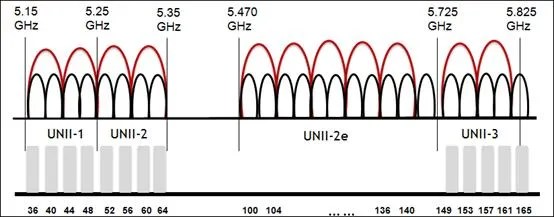
We routinely encounter venues that have assigned 40Mhz channel widths to their 5Ghz spectrum. It’s understandable. 40Mhz channels roughly double the available bandwidth for each user, which sounds like a good thing, so most venue IT staff set it that way. The issue is that (to use our prior analogy) this creates fewer, larger groups that can much more rapidly overwhelm the conversation in the room. A much better solution in these environments is to break it up into the maximum number of 20Mhz channels in order to maximise usage of the very limited Wi-Fi spectrum, even if any given conversation has a limited bandwidth.
One of the actions we’ve been able to complete for WordCamp EU is a basic site survey of the venue, ICE Kraków. You’d be surprised how many venues are deployed without ever doing a site survey or attempting to optimize the RF environment, and you can see the results of that in the below image, an overlapping channel graph for the third floor of the complex. During the site survey, we found that many APs were running on 40 and 80Mhz channels. What makes this problem worse is that the co-channel interference caused by consuming too much RF airtime negates any possible throughput advantages you could have gained from running on 40 or 80Mhz channels in the first place. It’s very much a self-defeating problem.
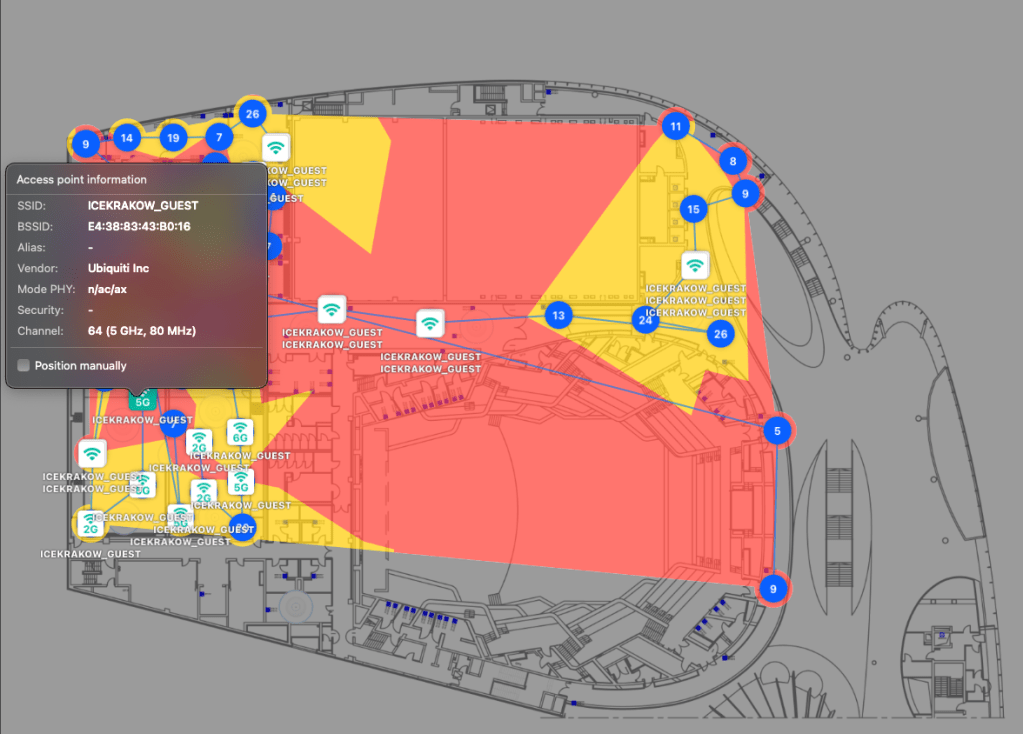
Thankfully, the folks at ICE Krakow are enthusiastic about improving their Wi-Fi environment, so we also worked with them to locate bandwidth and throughput limitations in their Wi-Fi switching network, and have given recommendations and potentially equipment to solve them. We have every confidence the issues will be sorted well before the WCEU ever kicks off.
So, that’s Wi-Fi. On to the next issue that plagues network-ops teams.
Streaming
Over three days of activities at WordCamp Asia 2026, we enjoyed a successful live stream with very few issues, despite the event being hosted in Mumbai during a period of general internet degradation across India:
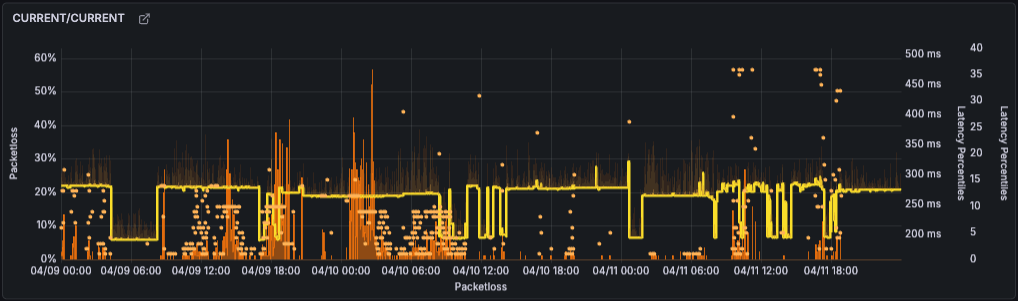
This wasn’t luck: After encountering some streaming issues during our CEO’s keynote at last year’s State of the Word, we had set out early to make sure we wouldn’t see a repeat occurrence at WordCamp Asia.
- Starting about six weeks before the event, we met with the venue’s internet provider to establish a baseline of connectivity—100Mbps synchronous, delivered over hard line—and discuss how this connectivity actually functioned in the real world.
- We extensively tested our streaming partner’s platform (Castr), and worked with our video and promotions teams to fully understand the backup options and understand the limitations and advantages of the various methodologies.
- We also completed pre-conference testing on video backup streaming. We quantified what a failover to our backup stream would look like to a viewer, what a switch back to primary entailed, and how to accomplish the switch in either direction.
- We developed an explicit set of specifications for the video stream to protect against outright failure: H.265 HEVC with an SRT transport. (More on this decision later.)
- We created a failure action plan, which included articulating the set of conditions under which we’d execute a change to the backup encoder/ISP and when we’d switch back to primary once it stabilized.
- We coordinated with off-site colleagues to monitor the stream remotely and use a dedicated channel to report to on-site personnel; that way, we could ensure that what the world saw matched what we were sending from the venue.
- We documented the process to recreate a YouTube event in case of a stream failure, and discussed with all involved parties so that everyone was clear on their duties in such a scenario.
- Finally, we developed a comprehensive cheat-sheet that showed all the streaming destinations that would be required for the video production team to use with their encoders. We wanted to minimize any complexity the video production team would face backstage, so gave them a simple set of destinations and a simplified cue-sheet to prevent overburdening them with tasks during the show.
Technical Considerations
As mentioned, we settled on a stream spec of H.265 HEVC with an SRT transport. We set a minimum specification of a M3-based Mac computer to allow use of HEVC, the hardware encoder that’s built into the M series chips. In the end, we used M4 Mac Minis that performed solidly.
H.265 allowed us to use roughly half the bitrate required for high-quality 1080p streaming. A subjective quality assessment showed that H.265 at 4500kbps was visually equal to H.264 at 7000-8000kbps. This helped make stream issues due to bandwidth limitations less likely.
We moved to SRT (UDP-based) transport over RTMP (TCP-based) transport after observing that internet quality issues could cause the stream to disconnect from Castr, which would cascade into YouTube stream failures. SRT streams can progressively degrade quite strongly without disconnecting in situations that would have caused an RTMP failure.
Granted, the internet quality in India was sometimes variable, and so we experienced a few of these issues:
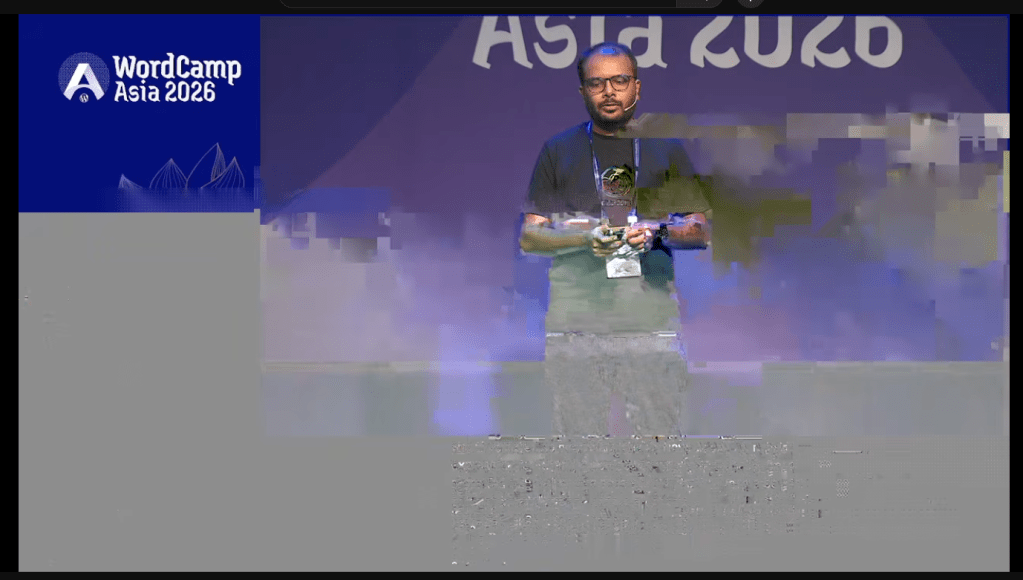
Even in these cases of video chunking, the audio remained coherent. The few times it occurred, we executed our backup failover plan for streams, and in all cases, the stream corrected immediately. We’d anticipated some level of stream degradation when we architected the backups, and we were rewarded by the smoothness of the results.
For my team, WordCamp Asia was a big win. The knowledge base we built during preparation was invaluable, and we’ll use it to inform future live streaming events like WordCamp EU. Even if the result was due to process engineering rather than technical wizardry, the outcome was the same: a solid stream that never went down.

